

Download Copylot (Forex Copier)
Expert Advisors Downloads

26.222 – 23 February 2026
Download Exp AI Sniper
Access the secure repository to download AI Sniper – the advanced self-improving trading robot for MetaTrader 4 and 5.
This package includes the latest executable files optimized for AI-based trading.
Why update? By downloading the latest version, you ensure your Expert Advisor utilizes the most recent intelligent algorithms and calculation logic.
Get the latest bug fixes and performance improvements for smart market analysis.
Full Changelog User Reviews Comments
Changelog:
— Modern micro-interactions: added smooth hover and cursor-target feedback across AI Sniper buttons and controls + improved responsiveness and visual clarity during fast trading actions.
— Lot input improvements: enhanced the Lot input field for more comfortable editing + improved readability and a clearer focus state when adjusting lot size.
— Tablet-friendly control: added an on-screen numeric keypad for the Lot field (perfect for tablets and the Strategy Tester) + enter the lot size directly from the keypad without using a physical keyboard.
— Strategy Tester usability: optimized interaction flow for backtesting scenarios where keyboard input may be inconvenient + quicker lot changes during test runs.
— Compatibility update: compiled using the latest MetaTrader terminal build 5640.
— Codebase improvements: performed refactoring and internal cleanup to improve stability, maintainability, and future feature development for AI Sniper.
— Overall polish: improved UI consistency across AI Sniper elements to match the premium Expforex style and reduce visual noise for a more focused trading experience.
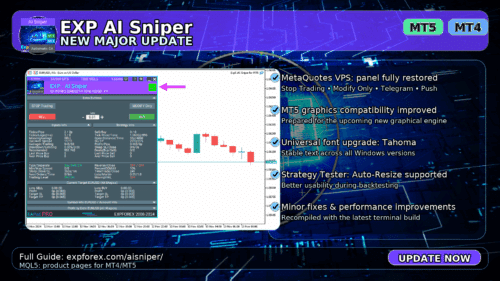
⭐ EXP AI Sniper — NEW MAJOR UPDATE
🆕🆕🆕🆕🆕🆕🆕🆕🆕🆕🆕🆕🆕🆕🆕🆕🆕🆕🆕🆕🆕🆕
⭐⭐⭐⭐⭐⭐⭐⭐⭐⭐⭐⭐⭐⭐⭐⭐⭐⭐⭐⭐⭐⭐
Exp – AI Sniper. Automatic Smart Expert Advisor for MetaTrader
🌐↔️↔️↔️ FULL GUIDE: https://expforex.com/aisniper/
⭐⭐⭐⭐⭐⭐⭐⭐⭐⭐⭐⭐⭐⭐⭐⭐⭐⭐⭐⭐⭐⭐
🆕🆕🆕🆕🆕🆕🆕🆕🆕🆕🆕🆕🆕🆕🆕🆕🆕🆕🆕🆕🆕🆕
🛠 MetaQuotes VPS — Panel Functionality Restored
-Complete recovery of panel operation on MetaQuotes VPS.
-The following controls are fully working again:
Stop Trading, Modify Only, Telegram Notifications, Push Alerts.
🎨 Improved MT5 Graphics Compatibility
-Enhanced visual rendering and UI stability on MetaTrader 5.
-Preparatory optimizations completed for the upcoming new MT5 graphical engine.
🔤 Universal Font Upgrade (Maximum Compatibility)
-Roboto font replaced with Tahoma for consistent display.
-Tahoma is supported across all Windows versions for stable text rendering.
📏 Strategy Tester Support — Auto-Resize Enabled
-Auto-Resize panel feature is now supported inside the Strategy Tester.
-More удобная работа с панелью во время backtesting.
🐞 Minor Fixes & Technical Improvements
-Numerous small bug fixes and UI consistency improvements.
-Internal code optimizations for better stability and performance.
-Fully recompiled with the latest terminal build for maximum compatibility.
A built-in technical support chat is now available in the terminal for urgent program-related questions.???? How does it work?
The chat connects to the main module on our website. For a more detailed response from Expforex AI, please visit our website.⚠ Attention! Beta version! Some functionality may be temporarily limited.⚠ Attention! It takes about 5 seconds to connect to the server and receive a response (depending on the quality of your internet connection). If the connection fails, please try again later.⚠ Attention! In Beta Testing, there are limits on the use of the Expforex AI assistantd
???? How to set it up?
To ensure the chat works correctly, you need to allow WebRequest for the following URL in the terminal settings:
Open terminal settings → go to the Expert Advisors tab
Enable the option Allow WebRequest for listed URL:
Add the following URL: https://expforex.com
???? See the image above for a setup example.
???? Language Updates
Several translations have been corrected.
Arabic language: text and symbol direction are now displayed correctly.
If you find any issues, please let us know!
-Fixed the error excessive use of disk space when optimizing Expert in MQL5 CLOUD NETWORK-Performance improvements and fixes based on crash logs.-We are excited to introduce new languages to our functionality. Users can now enjoy an even wider range of language options for their convenience and comfort. Here’s the list of newly added languages:
THAI=12 — Thai
INDI=13 — Hindi
MALAY=14 — Malay
INDONEZIA=15 — Indonesian
ARAB=16 — Arabic
VETNAM=17 — Vietnamese
BALKAN=20 — Balkan
POLAND=21 — Polish
CHEZH=22 — Czech
Update your application and enjoy working in your native language! ????
-Compiled in the latest terminal build for improved compatibility and stability.
-Synchronized with the latest platform updates to support new features and improved functionality.
EAPADPRO v59
–Enhanced Graphical Interface Translation
We have completely revamped and updated the translations across all elements of the graphical interface. This ensures a more accurate and natural localization, allowing the interface to better reflect the linguistic and cultural nuances of our diverse user base. As a result, interacting with the application is now even more seamless and intuitive, providing a more personalized and comfortable user experience.
–Introduced Informative Tooltips for Panel Elements
To elevate user convenience, we’ve added descriptive tooltips to various panel components. When you hover over buttons and icons, informative explanations about each element’s functionality will appear instantly. This enhancement significantly simplifies navigation and interaction within the application, making it easier for both new and experienced users to utilize all features effectively.
–Resolved Minor Bugs and Boosted Stability
In this update, we’ve addressed and fixed several minor bugs that were affecting the application’s performance. These corrections enhance the overall stability and reliability of the program, ensuring a smoother and more consistent user experience. By eliminating these small issues, we’ve laid the groundwork for a more robust and efficient application.
Fixed error in profit/price/time of closed position in notifications.
Fixed INFOBOX error when deleting the EAPADPRO window.
Last build compilation
Version 24.601 2024.06.01
Start AI SNIPER
この記事は次の言語でもご覧いただけます: