
















The Pendulum or Swing strategy involves the sequential opening of pending orders with an increased lot size. The core principle…

EAPadPRO – Information panel for our experts. Dashboard for Expert Advisors

Duplicator – Duplication of deals/positions on the MetaTrader terminals

Main
Documentation
Settings
FAQ
Changelog
Reviews
Comments
Extra
About Tester Pad
The utility allows you to manually test your strategies in the Strategy Tester.
One-click trading on the Visualization Chart.
Convenient and comprehensive functionality for testing your trading skills is now available in the Strategy Tester as well.
Management of positions and orders, Trailing Stop, Stop Loss, Take Profit, lots, installation and removal of pending orders, and construction of the Order Grid.
Trade with your Indicators!
Forex Trading Simulator!
The main functions of our utility
- Works in MetaTrader Strategy Testers 4 and 5;
- Deal, Position, and Order Management;
- Possibility to work with any Indicators;
- Stop Loss, Take Profit, Trailing Stop, Order Grid;
- EAPAD PRO Chart Friendly Dashboard;
- Speed Control, Pause, and Chart Control in 1 click. And so on.
You can test any Indicators you have.
You can practice trading in the Strategy Tester even on weekends when the market is closed.
By improving your experience in trading your strategy, you improve the result of your work.
Our free Tester Pad is a tool that helps all traders in the world.
Your gratitude is your feedback and review of our utility.
Are you asking if traders can engage in trading practice sessions using the Strategy Tester during weekends, even when the market is closed?
If so, the answer is yes! By utilizing this tool, traders can enhance their trading experience, refine their strategies, and ultimately improve their trading results.
Our Tester Pad is a completely free utility that is available to traders all across the globe, and it has helped many traders achieve their goals.
We would be extremely grateful if you could provide us with your feedback and review of our utility.
Your input will help us to continue improving our product and better serve the trading community.
How does Tester Pad work?



What do people write about TesterPad?

k16081
Tolles One Click Pad mit vielen nützlichen Funktionen, zb Trailing Stop, Breakeven usw. Und das Ganze kostenlos, zum Scalpen Perfekt ????-
Kurren James Kidd
A must have to gain experience in manual trading. Usually you would need to wait until your ideal trading times which might only be an hour a day. With this you can literally practice all day allowing you to increase your trading experience by multiples of what you could do so before. You can also choose any date in the tester, so you can choose volatile times, trending, news, etc. You also have the option to speed up / slow down the visual back tester. Without this tool, it would be equivalent to only being able to practice basketball for an hour a day. With this tool, you could practice all day, reverse time to different seasons, and even fast forward or slow down time to get a better understanding of how basketball (price) works. -
daminique
best manual backtesting tool. -
alexanderarieaa
Я 20 лет на рынке, можно сказать, динозавр этого дела. Какое - то время я гонял тесты в обычном метатрейдере, но потом понял, что видя справа "будущее поведение валюты", я сам себя обманывал и тесты мои не соответствовали реальной торговле. Позже я начал поиск симуляторов ручных стратегий, перебрал около 5 наиболее известных, но..... вдруг, случайно наткнулся на этот тестер и ..... - это лучший тестер из всех! Не стоит ничего искать, покупайте, качайте и пользуйтесь на здоровье. Удачи! Отзыв не заказной. -
Urs Martin von Känel
Thank you for the useful tool! -
Thank you. This is what I was looking for. Better than real time demo trading.
-
Hussein Alamoudi
Hello, a very, very, very wonderful tool. Thank you very much for the wonderful tool. It has improved my trading in a very large way and the work is comfortable now in trading, unlike the past, very tiring. I want to thank you again for the wonderful product and the wonderful work. I hope my friend will make an addition to the tool box Coment and thank you again -
Toko TERUS
thanking you so much for your great generosity. God bless you. Amen i am dreaming to have the new version with the panel more or less like MT's -
King Wai Lam
Thank you so much for this free tools, this is very very useful!!! Esp during the weekend, the market is closed, we still can practice the manual trade!! Your other products are great too!! Like! -
david mackay
I use this tool quite a bit to improve my manual trading. I had been using Forex Tester but this tool is, for me, much easier to use and configure. Takes only a minute to get the indicators on the chart and start 'scalping', it keeps a record of all the entries and exits. Before I discovered this little gem I had to get another software to replay the day's trades. and that cost me over $100 per month. I know many traders that replay the day's action so that they can improve their entries and see their errors. Considering that MT4 is free and this tool is free, this is a great gift! This tool is also great for developing indicator usage for an adviser. Vlad... this thing is a super gift, thank you!! -
arezt ryechoz
very help for backtesting -
alexspotter
This software is a must have -
watt nid
It's a great help for manual backtesting, thanks. -
Shum73
Ребята, Вы-молодцы! -
hossein shariati
thank you
You can Download free TesterPad
FULL for FREE!
This is FULL FREE version without limits!
You can download and install our program for free!
Links
Free Download .zip
Watch Video
Download to MT4
Download to MT5
Add Review / Comments for MT4
Add Review / Comments for MT5
Useful links
Table of Contents (click to show)
Description
This utility is designed to manually test your strategies in the Strategy Tester.
Convenient and complete functionality for testing trading skills is now available in the Strategy Tester.
The program has a single codebase and is suitable for MT4 and MT5 terminals.
Management of positions and orders, trailing stop, stop loss, take profit, lot sizes, installation and removal of pending orders, and construction of the order grid. Trade based on your Indicators.
Foreword
In 2009, we created a utility, VirtualTradePad, for one-click trading and training in the MT4/MT5 Strategy Tester.
The program was developed as a separate Expert Advisor and a program written in Delphi.
This was called the VirtualTradePad 2in1 Simulator for MT4 and Visual Trade.
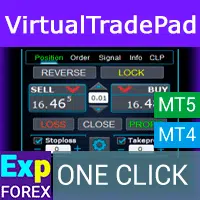
VirtualTradePad (VTP) Trading Panel. Trade Pad for One Click Traiding from Chart and Keyboard
VirtualTradePad or VTP – control panel for trade in 1 click in MetaTrader 4 and 5. Trade in 1 click from the terminal graph. Trade with the keyboard. The program for scalping and manual trading on Forex. VirtualTradePad have more then 30 buttons: buy, sell, buystop, buylimit, sellstop, selllimit, close, delete, modify, trailing stop, reverse, lock, Grid, VirtualStops, Profit/ loss total close and more…..
Over time, we gained additional experience.
The versatility of the programming languages for trading terminals has expanded tremendously. There’s no limit to what you can accomplish with this powerful tool at your disposal.
Trade, play games, watch movies, draw, surf the Internet, and more…
The issue of trade training has always been a problem for us.
We explored different ways to solve this problem.
And the solution was right in front of us.
By combining the functionality of our universal panel for EAPADPRO Advisors and the power of our trading engine for VirtualTradePad, we created the Forex trading simulator product, Exp-Tester PAD, for testing your strategies in the MT5 and MT4 Strategy Tester.
You are welcome.

How to Start
To get started, you need to download the TesterPAD to your terminal.
How to Install an Expert Advisor and Indicators to the MetaTrader Terminals
How to install a Trading Advisor in the terminal and configure it to work with MetaTrader. In this article, we will show you what needs to be done for your indicator or utility to work […].
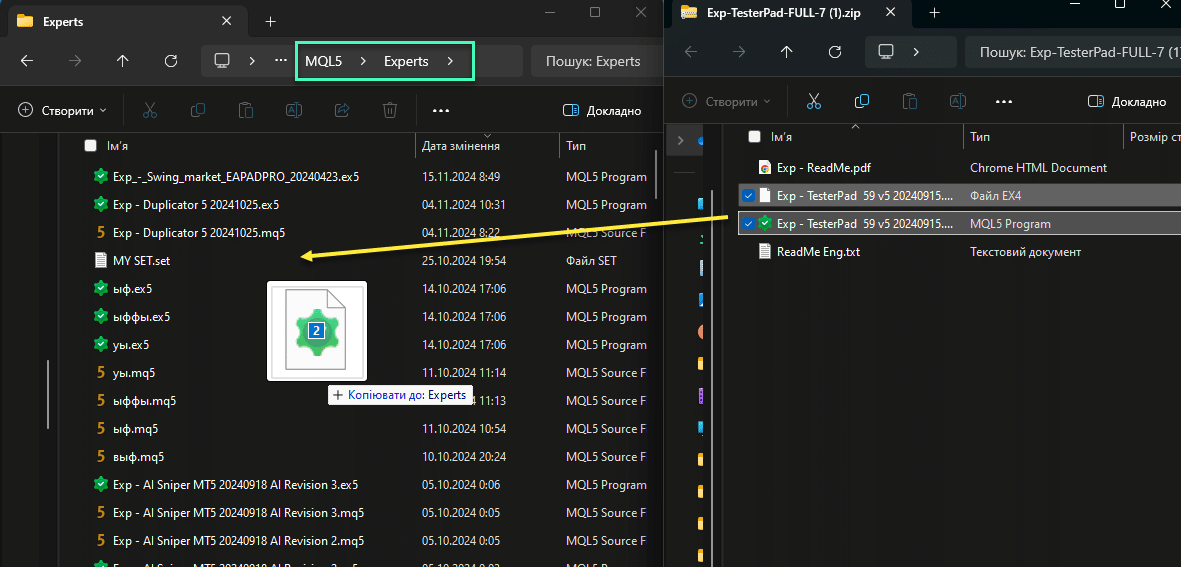
Copy the file to the MetaTrader – MQL5/4 – Experts folder.
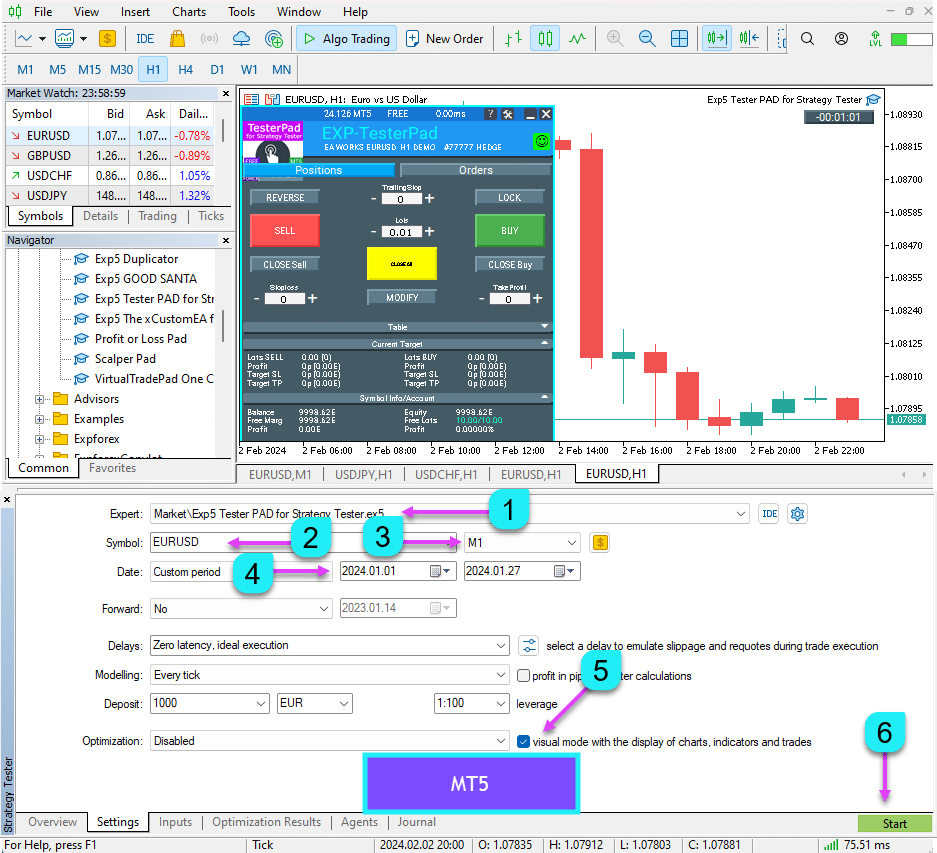
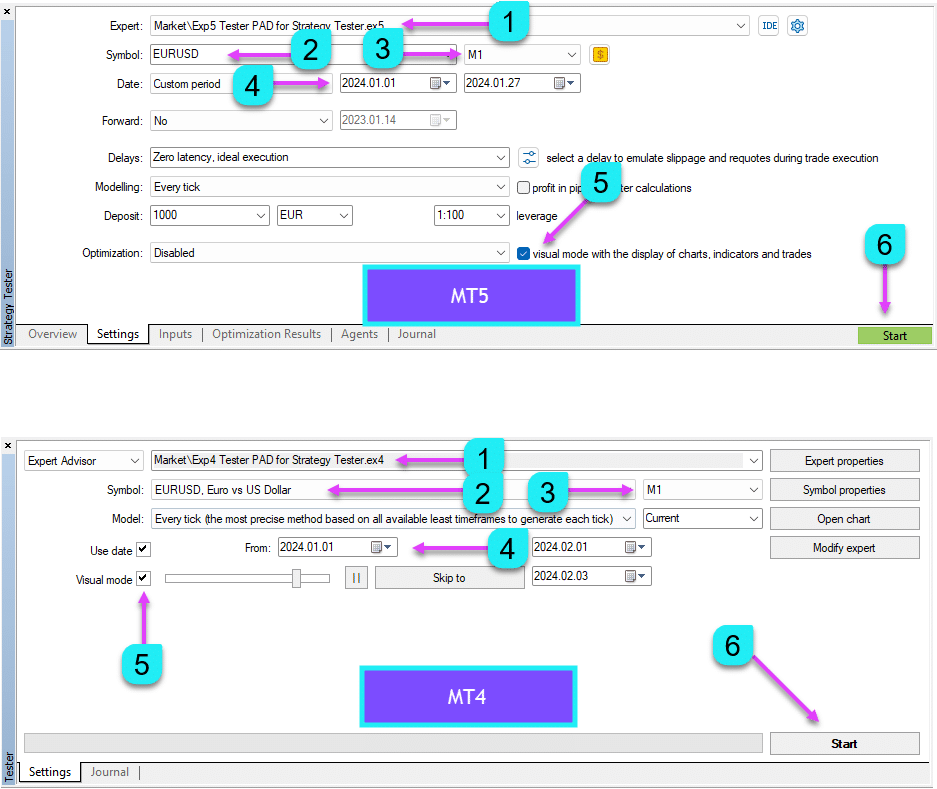
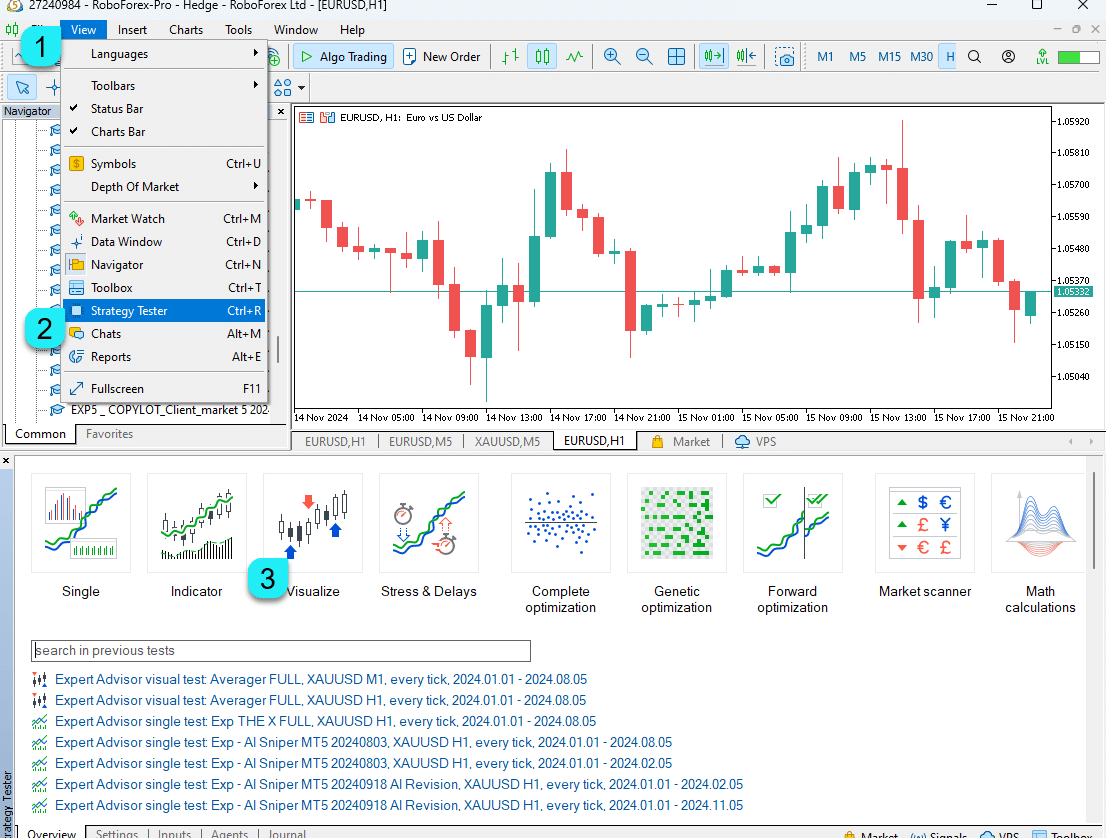
In MetaTrader 5, open the Strategy Tester or press Ctrl + R and select Visualization Mode.
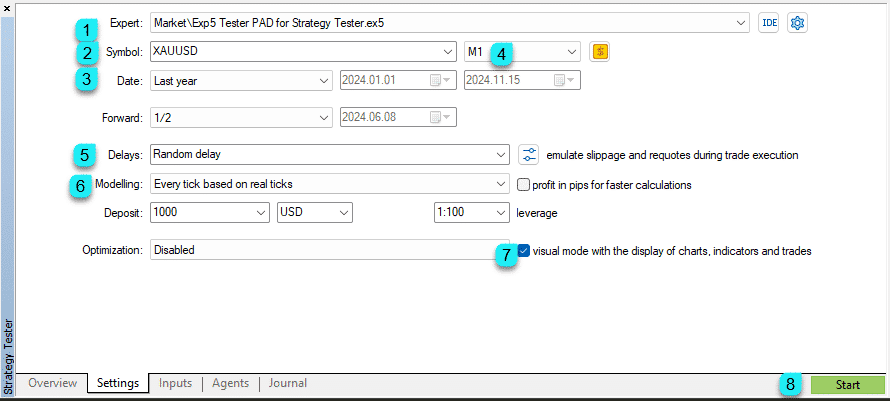
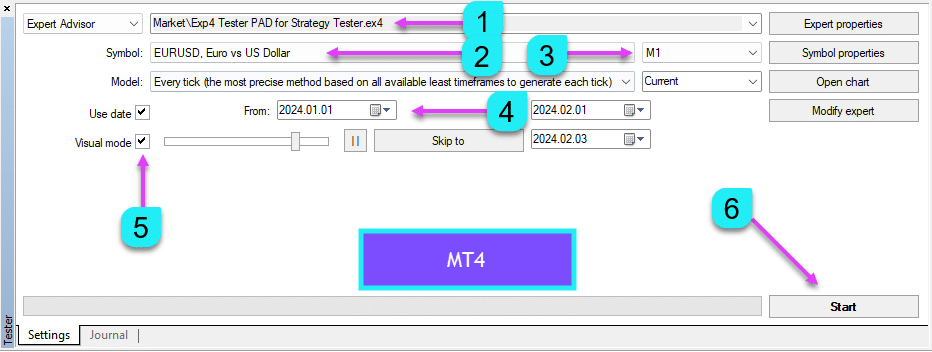
Select Our Expert Advisor and set up other parameters (symbol, TF, test date)
Be sure to check the Visualization box (if it is not already checked).
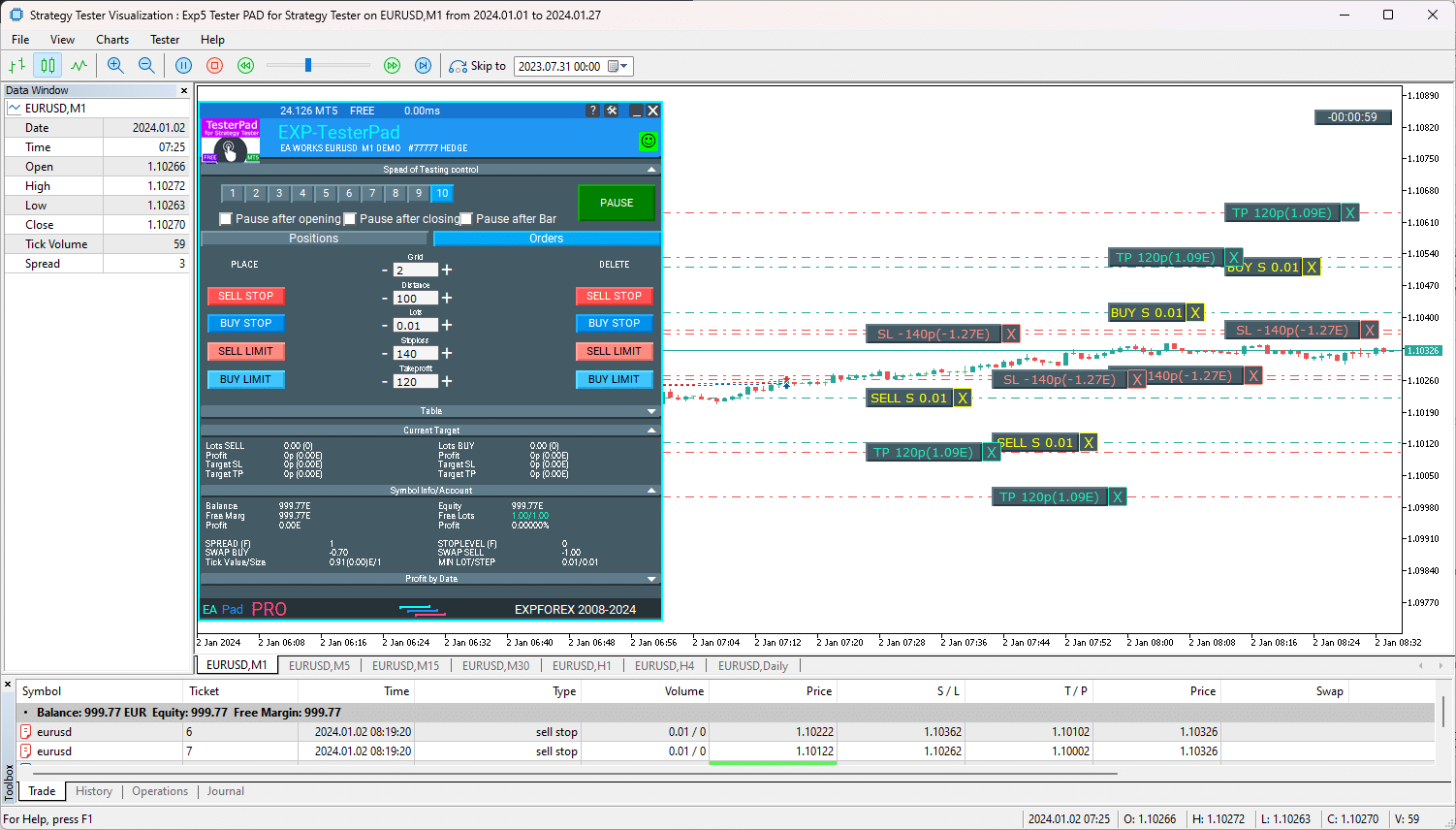
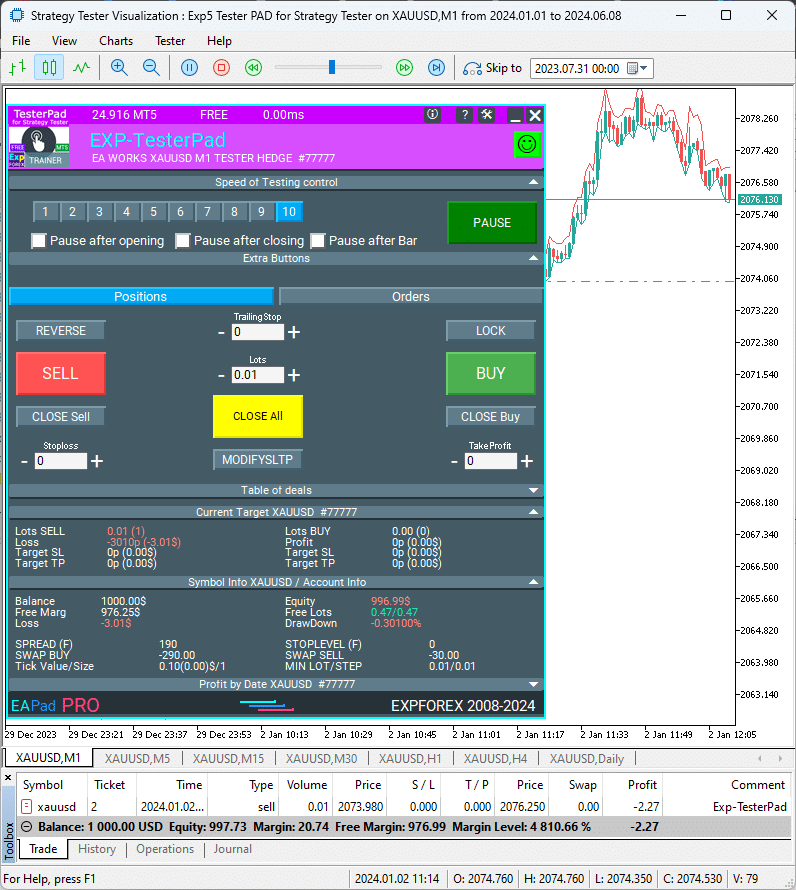
Now You Can Trade with TesterPad in Strategy Tester
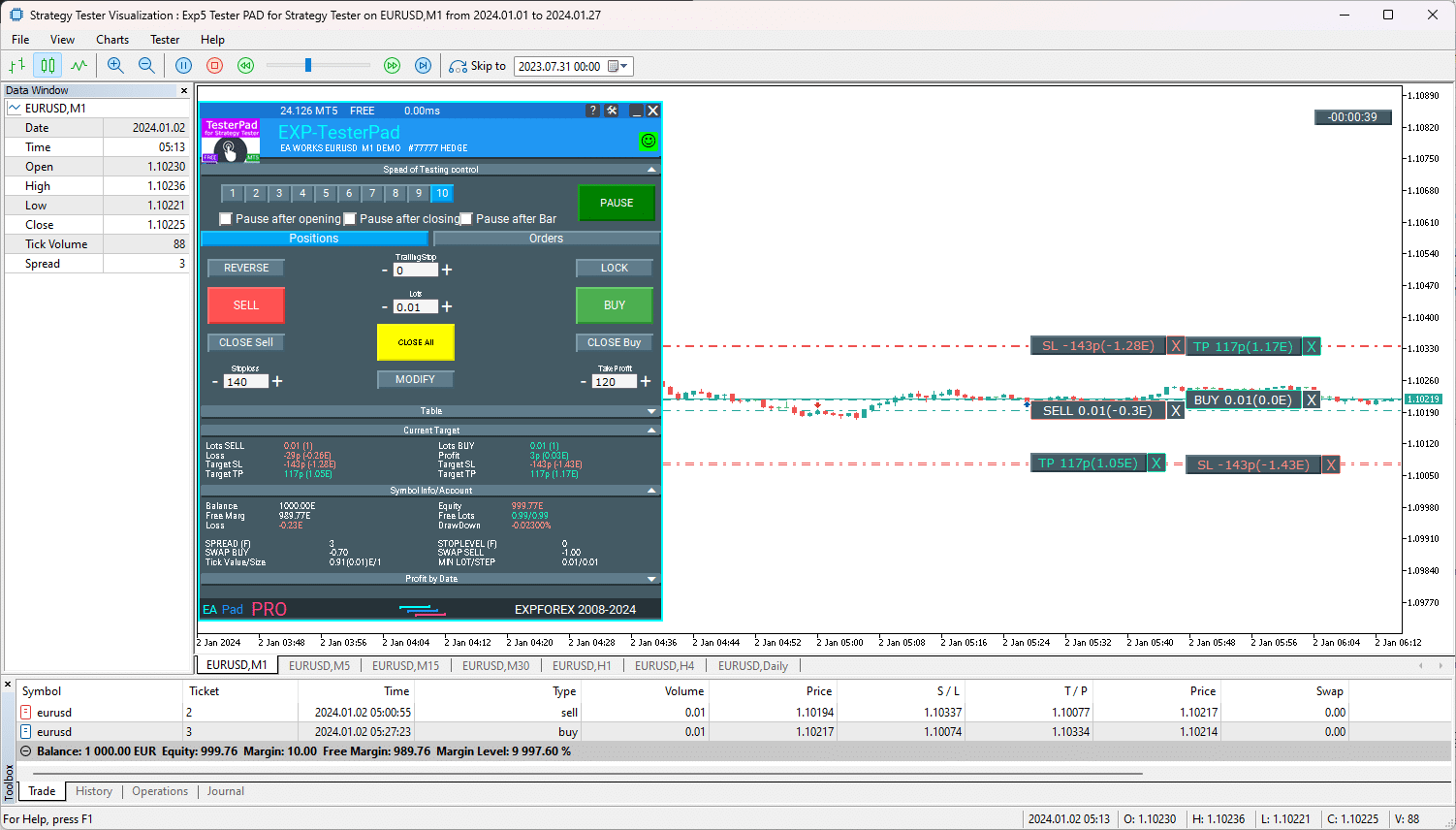
You can monitor speed, trades, and more in the Strategy Tester, and you can use our TesterPad panel.
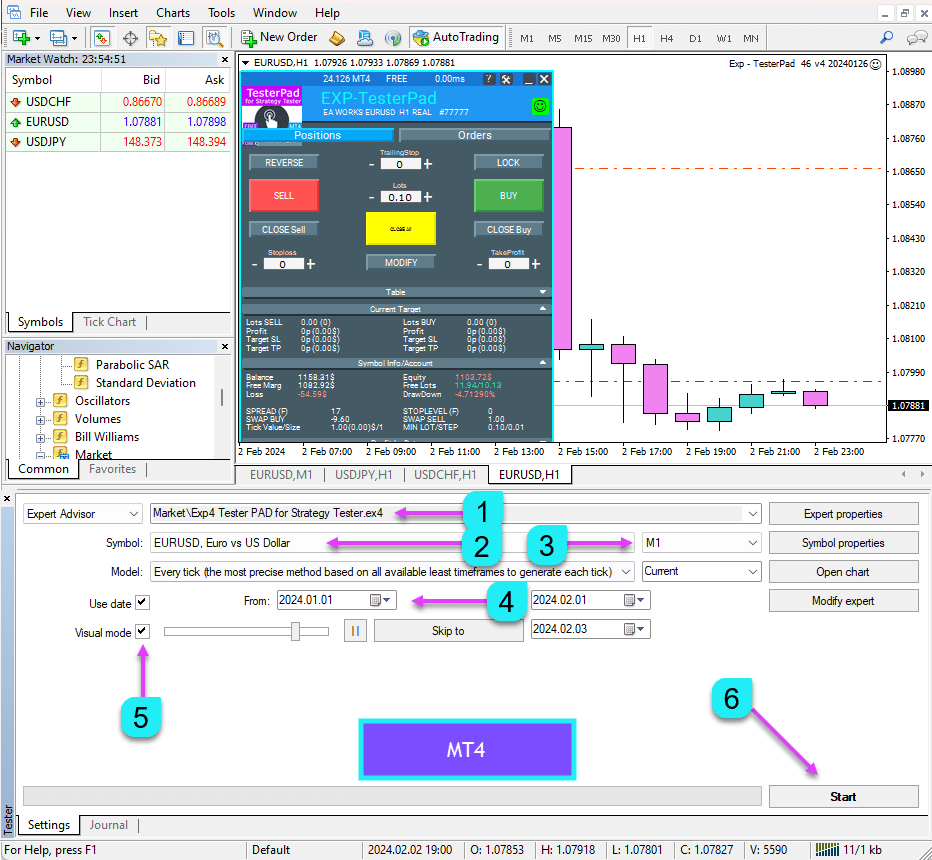
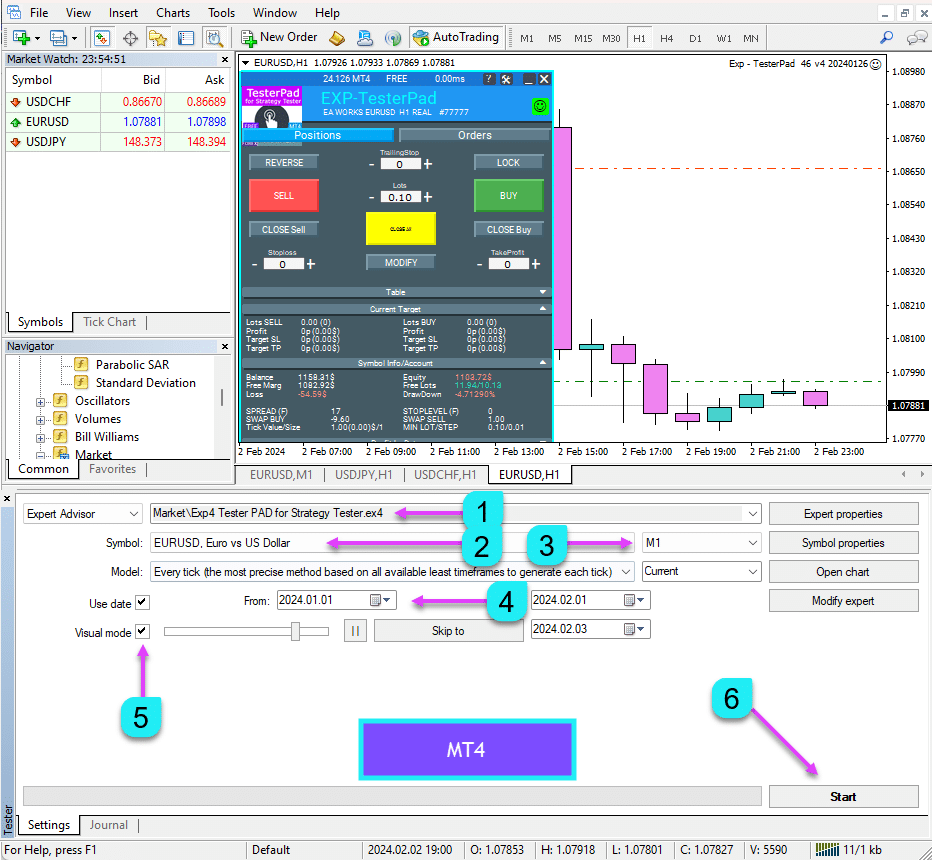
In MetaTrader 4, open the Strategy Tester or press Ctrl + R and select our Expert Advisor.
Check the Visualization box and set up other test parameters (symbol, TF, test date).
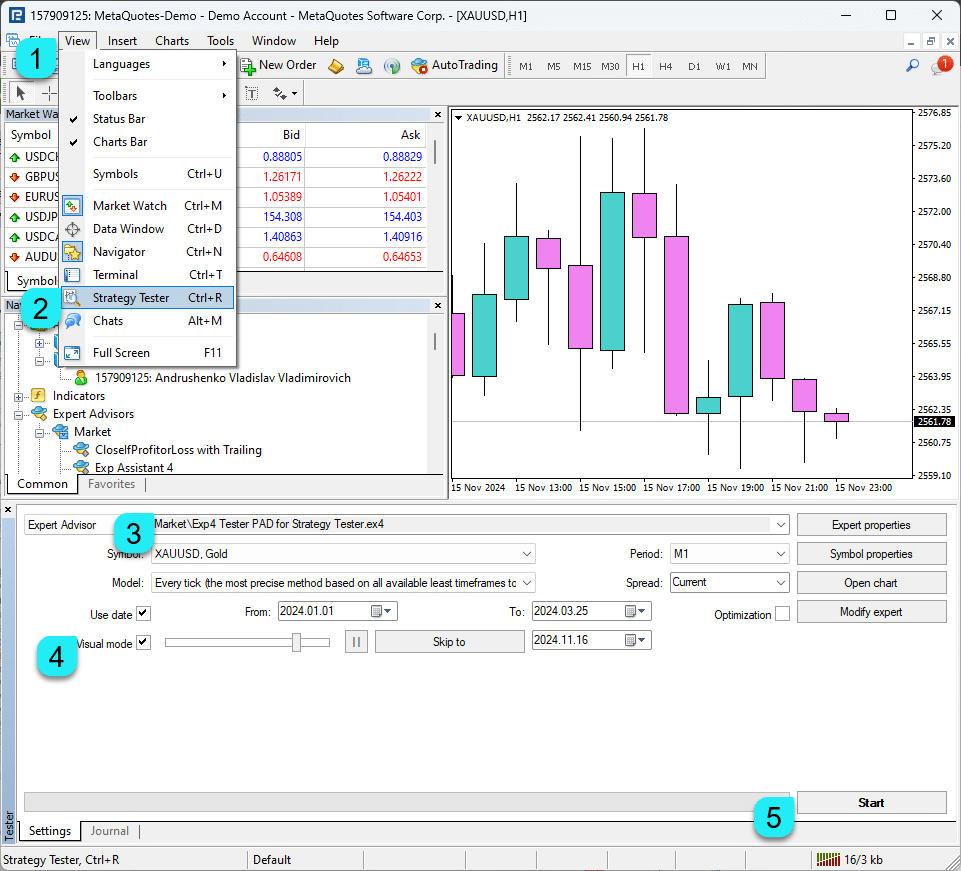
Control
To use this panel, you must load the Strategy Tester in your terminal in Visualization Mode.

General Concepts: The Expert Advisor responds to button presses only upon the arrival of a new tick.
It’s important to consider the quotation speed you select when using the Expert Advisor (EA) since it will only respond to button presses once a new tick appears on the screen.
Additionally, when using the input field in the Strategy Tester, it’s not possible to adjust the digital levels directly. Instead, you can make adjustments using the + and – buttons.
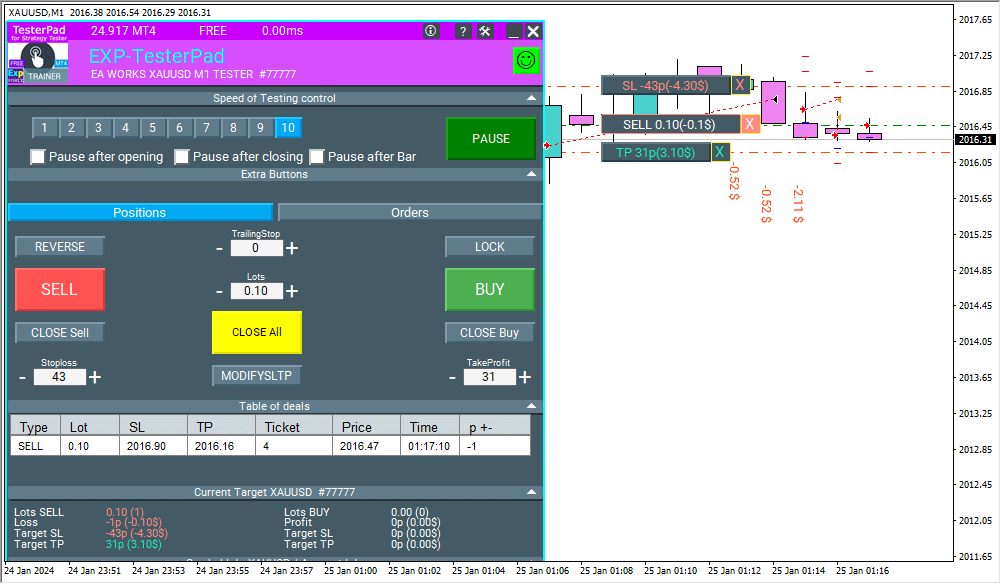
Managing the Speed of the Simulator
A new unit allows you to control the speed of the simulator on the current chart.
This unit is relevant for the MT4 terminal, but in MT5, it is built-in.

The Control Unit allows you to manage the speed of quotes and the speed of testing.
The speed is divided into 10 levels, which correspond to the standard speed of the Strategy Tester in the terminal.
1 – Slow, 10 – Fast!
PAUSE button – allows you to pause the testing and operation of the simulator.
Checkbox and the ability to set a pause after opening a position (activation of a pending order, opening a new position) or closing positions.
If a position has been opened or closed, the simulator automatically pauses.
To continue the simulator, press the START button!
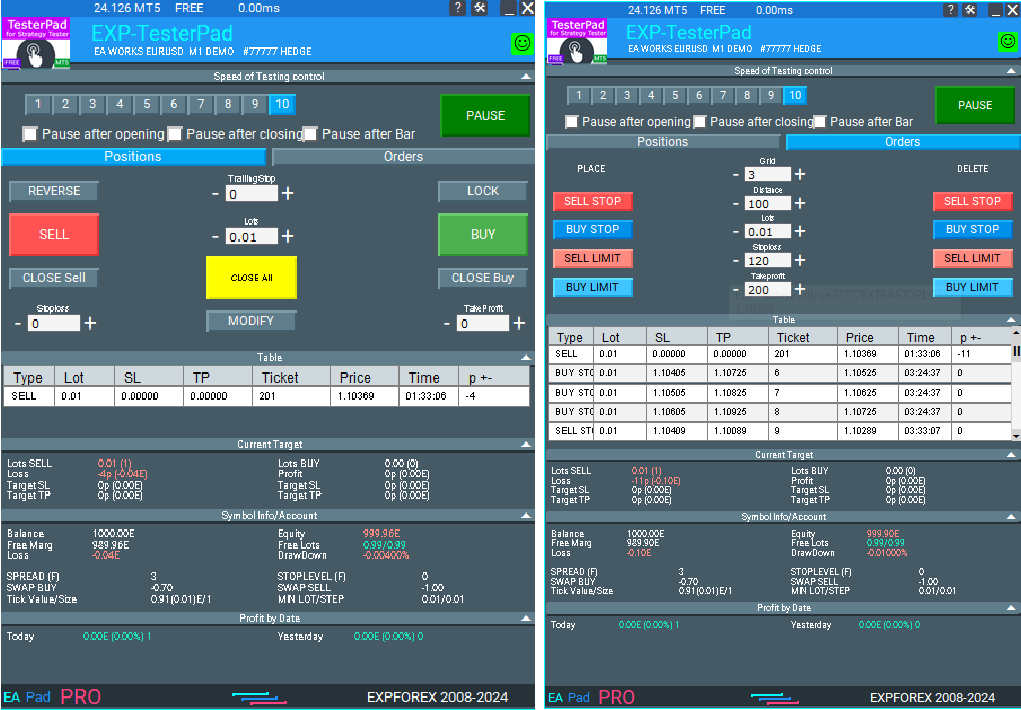
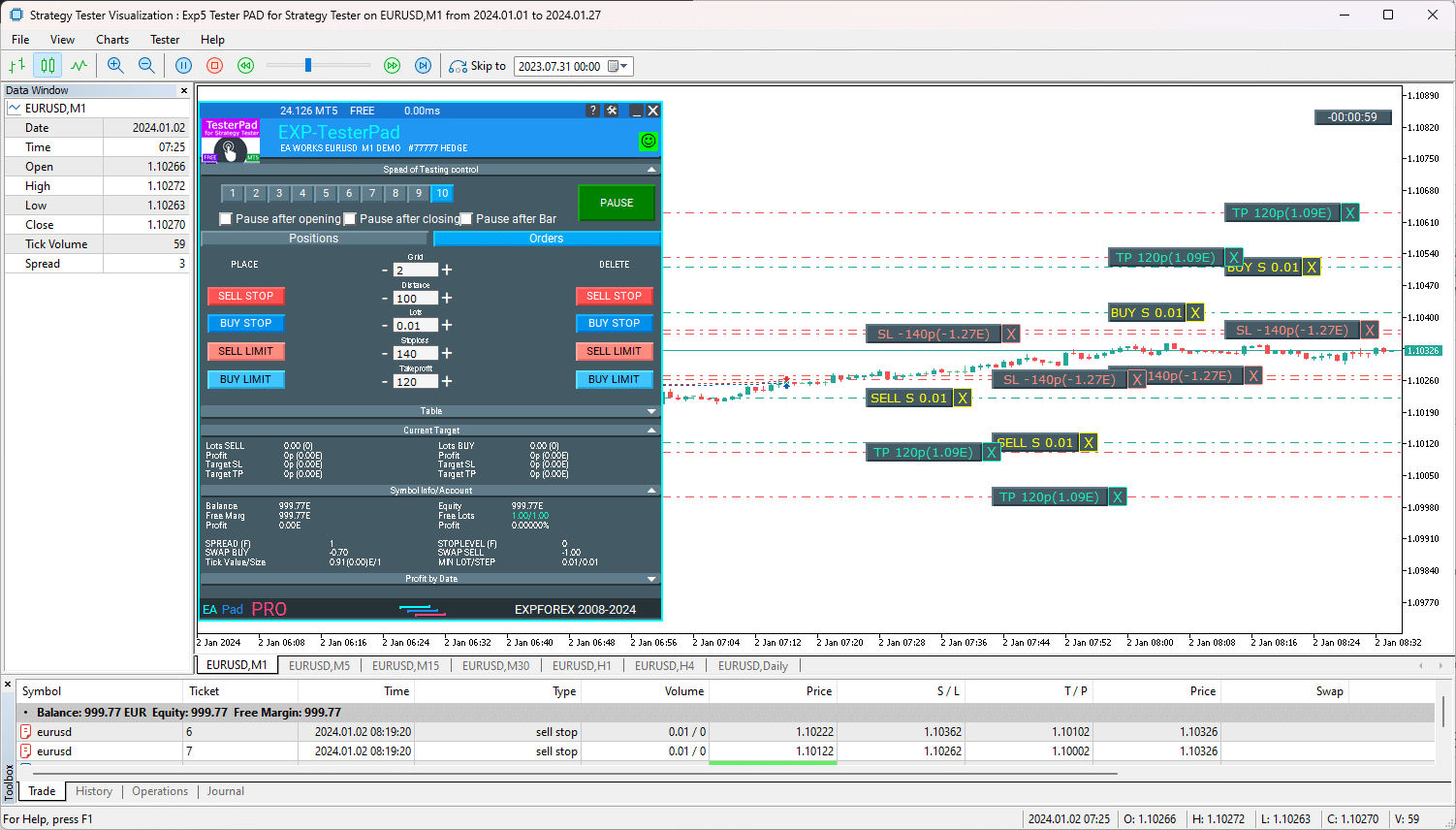
The panel contains 2 tabs for trading:
The Positions Tab
This tab is designed to work with positions.

- Reverse – Flips the current positions. If there are multiple positions, the Advisor reverses all positions, changing their type from Buy to Sell and Sell to Buy. Stop Loss and Take Profit are also set.
- Lock – Locks current positions. If there are multiple positions, the Advisor calculates the lot size for locking and opens a position that locks all other positions. Stop Loss and Take Profit are set to 0.
- Trailing Stop – Applies a Trailing Stop to the position. The Trailing Stop is activated only when the Trailing Stop value field is greater than 0. In the Trailing Stop field, specify the trailing stop distance in Points (Pips).
- Sell – Open a SELL position (Deal).
- Buy – Open a BUY position (Deal).
- Lots – Select the lot size for the position to open. The lot size increment depends on the contract specifications.
- Close Sell – Closes all SELL positions (Deals).
- Close Buy – Closes all BUY positions (Deals).
- Close All – Closes all positions (Deals).
- Stop Loss – A field for entering the Stop Loss value in Points (Pips). If the value is 0, Stop Loss is not set. For ease of use with 5-digit quotations, the increment step is 10 Points (Pips).
- Take Profit – A field for entering the Take Profit value in Points (Pips). If the value is 0, Take Profit is not set. For ease of use with 5-digit quotations, the increment step is 10 Points (Pips).
- Modify – The button for immediately modifying the current Stop Loss and Take Profit values for all positions.

The Orders Tab
This tab is designed to work with pending orders.
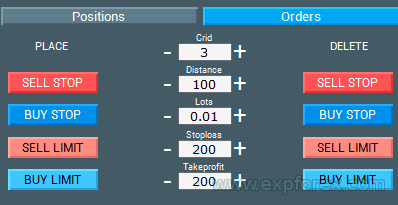
- Sell STOP/LIMIT – Opens a sell pending order.
- Buy STOP/LIMIT – Opens a buy pending order.
- Lots – Select the lot size for the position to open. The lot size increment depends on the contract specifications.
- Delete Sell STOP/LIMIT – Closes all SELL STOP/LIMIT orders.
- Delete Buy STOP/LIMIT – Closes all BUY STOP/LIMIT orders.
- Stop Loss – A field for entering the Stop Loss value in Points (Pips). If the value is 0, Stop Loss is not set. For ease of use with 5-digit quotations, the increment step is 10 Points (Pips).
- Take Profit – A field for entering the Take Profit value in Points (Pips). If the value is 0, Take Profit is not set. For ease of use with 5-digit quotations, the increment step is 10 Points (Pips).
- Grid – A field for entering the number of pending orders in a grid format.
- Distance – The distance from the current price to the pending order. The order setting level and the distance between the order grid in Points (Pips).
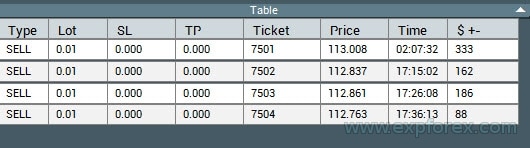
Open Deals Table
This block displays a table of open Deals and Positions.
This block is also relevant for the MT4 terminal, but it will also be useful for MT5.
This block allows you to monitor current positions without referencing the terminal report.
By default, this block is hidden.
You can activate it by clicking on the corresponding arrow “Table”!
EAPADPRO Control Panel
All other tabs and controls belong to our universal EAPADPRO.
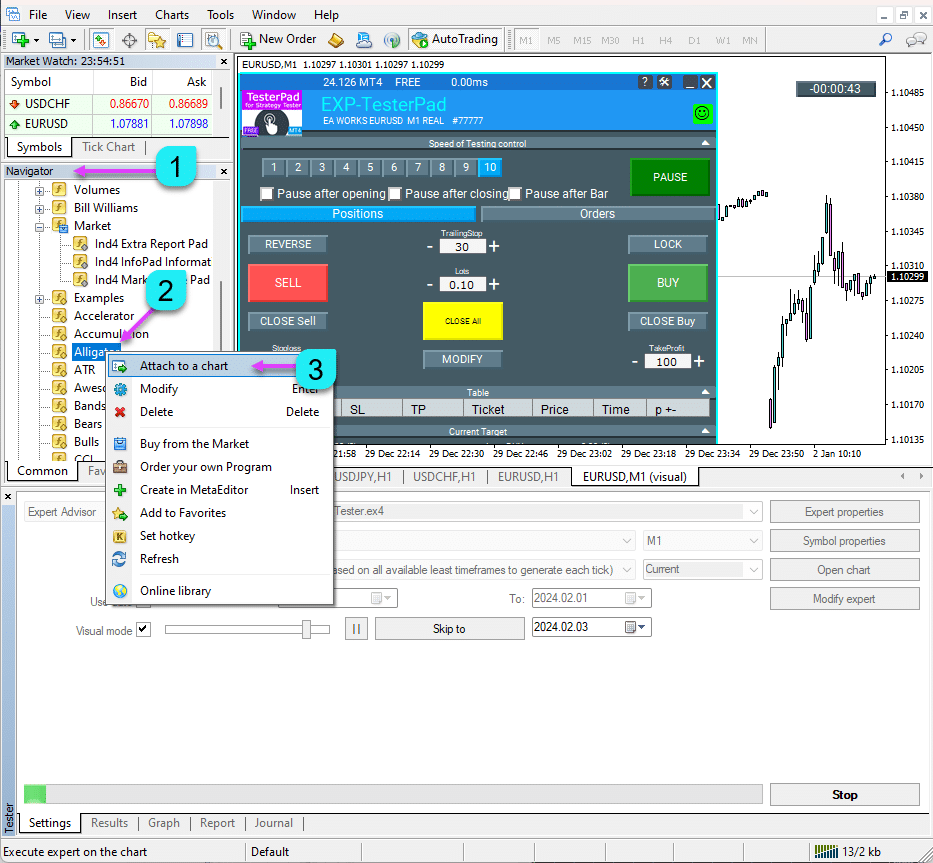
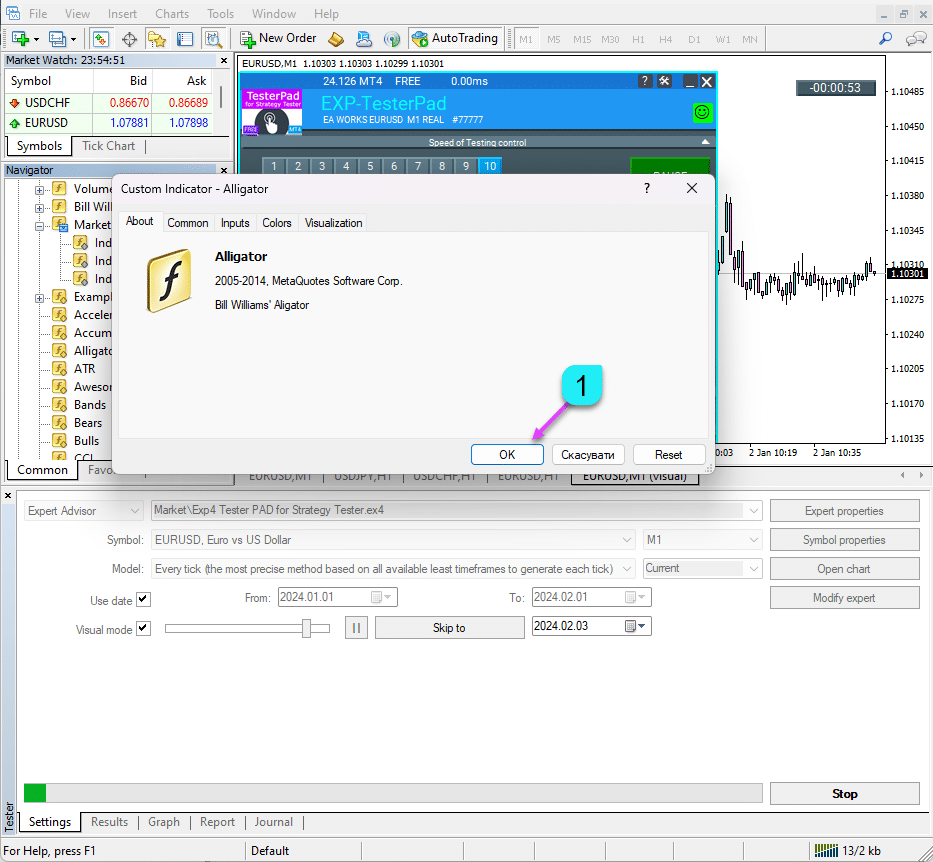
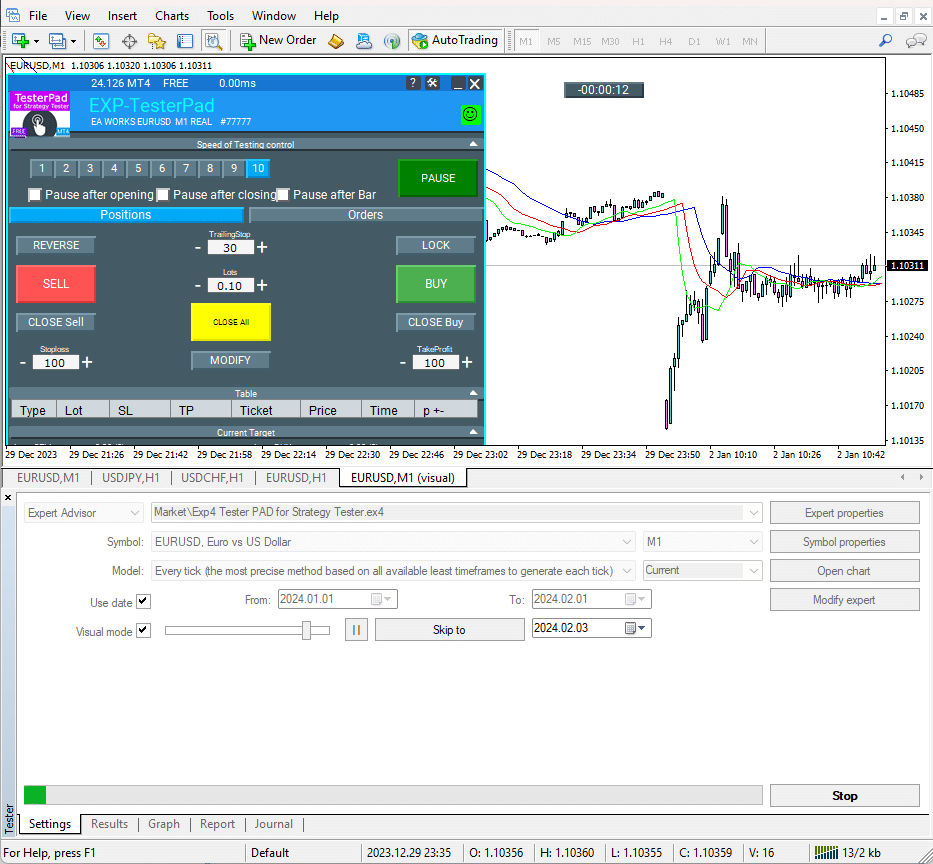
Loading Indicators in the Strategy Tester MT4
You can also upload your indicators and templates for trading in the Strategy Tester.
In MT4, this is done directly on the visualization chart.
In Normal Mode, transfer the indicators from the Navigator to the Tester’s chart.
Loading Indicators in the Strategy Tester MT5
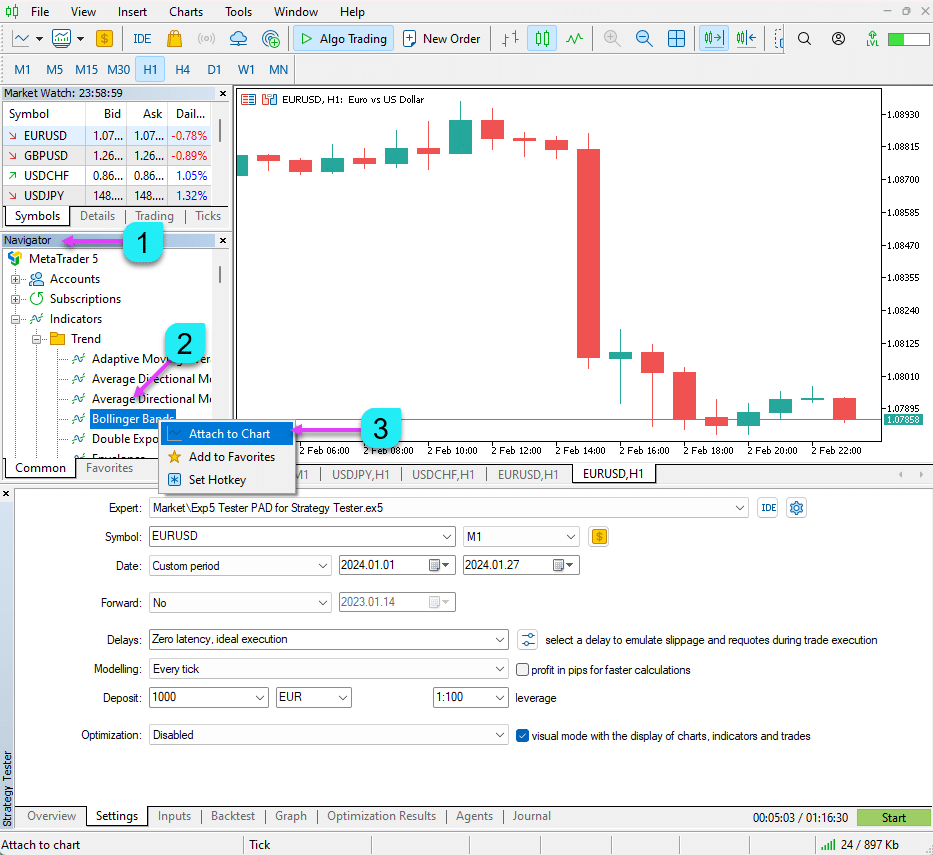
- Open a standard chart on your account.
- Add all the necessary indicators and configure them.
- No need to add TesterPad to the chart.
- On the chart where the indicators are installed, right-click and select Templates – Save Template.
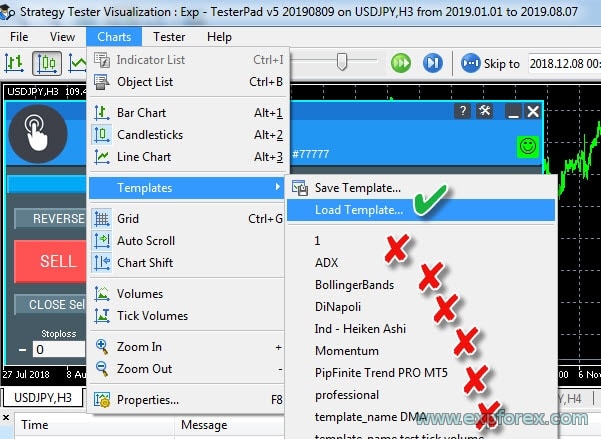
- In the Strategy Tester, on the visualization chart in the top menu, select Charts – Templates – Load Template.
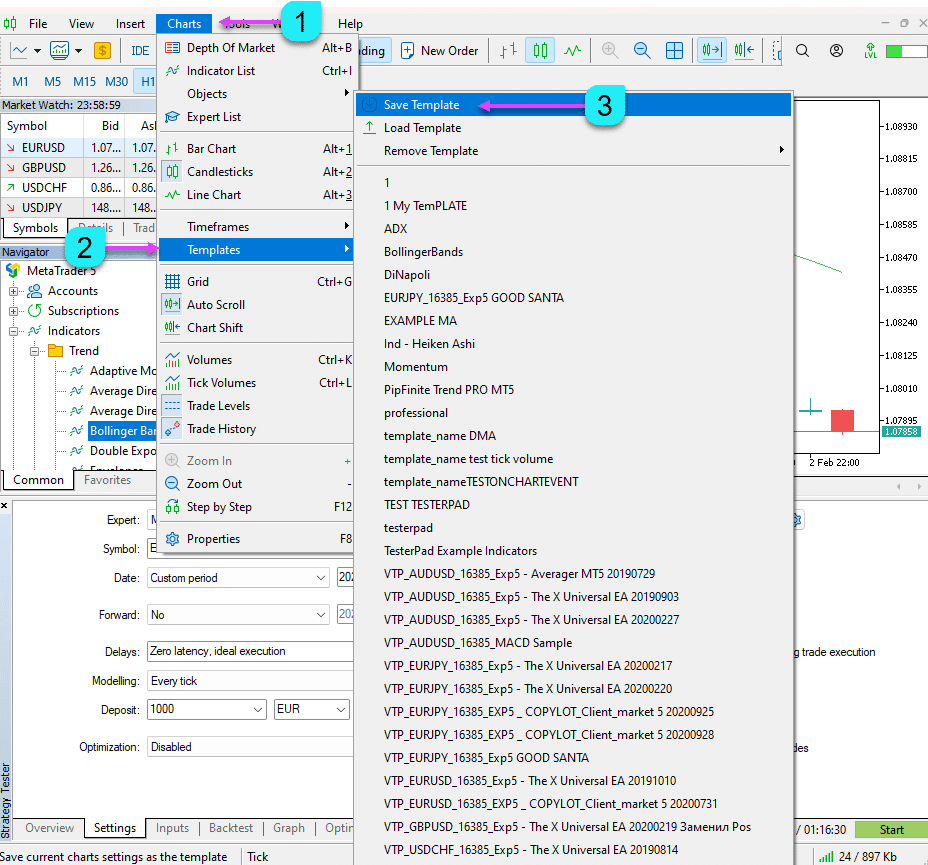
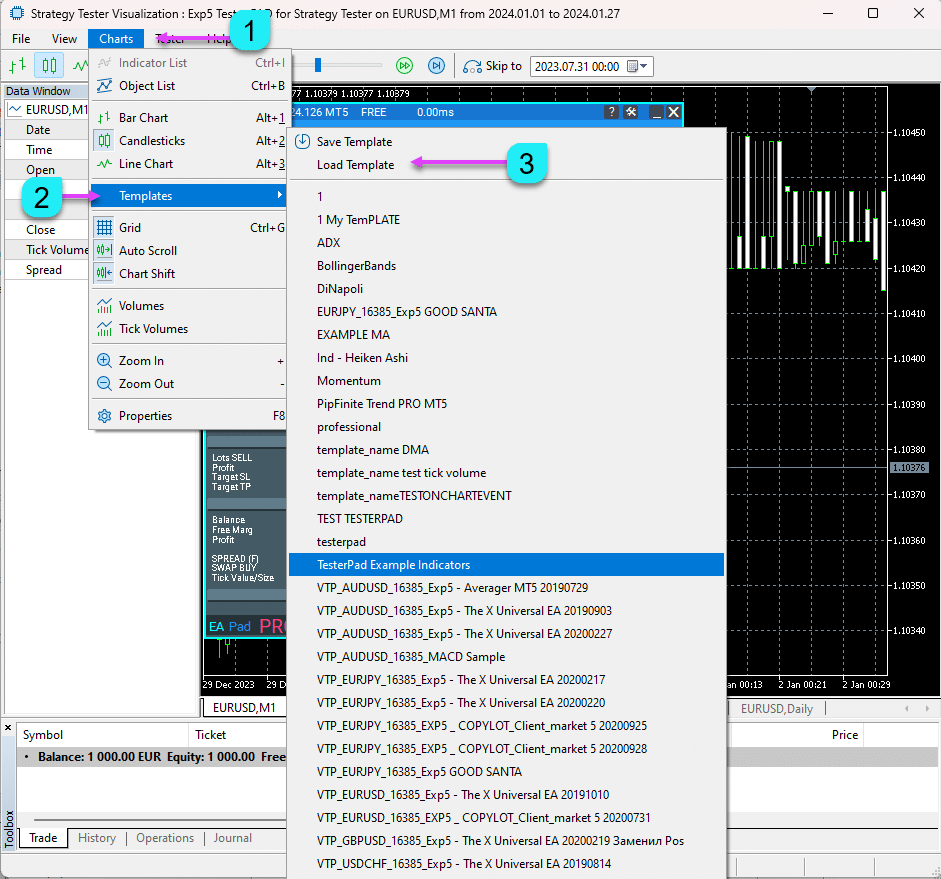
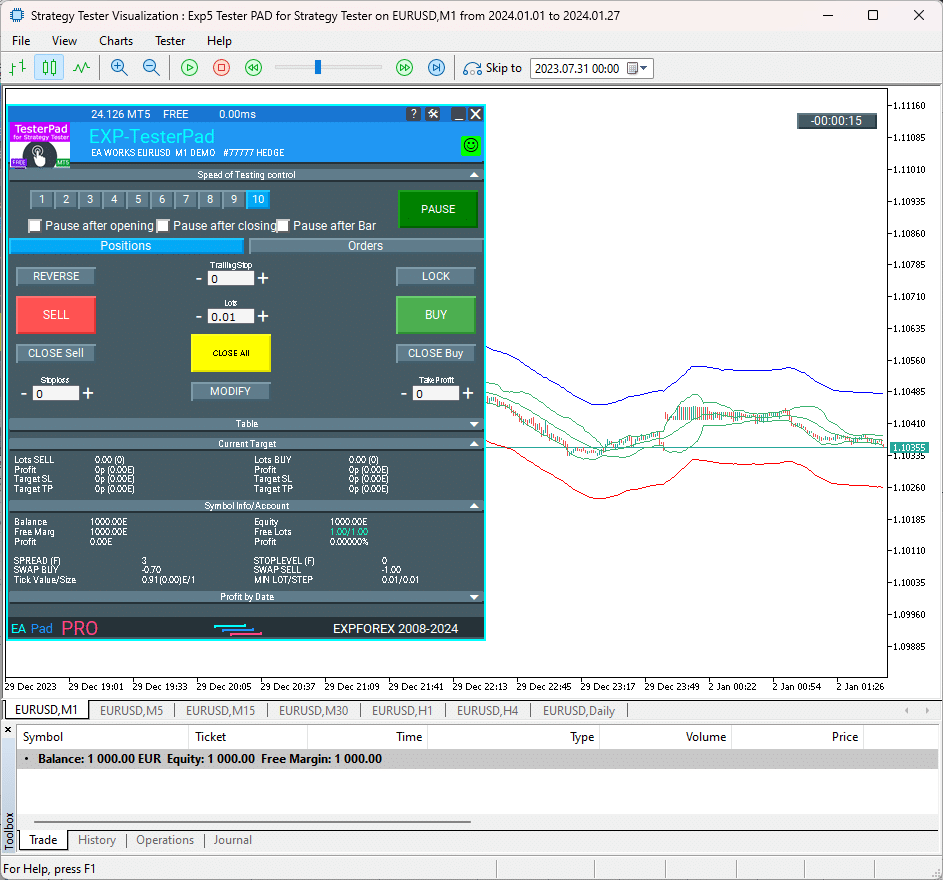
IMPORTANT: If you are unable to download the chart template from the list (Charts – Template), try downloading via LOAD TEMPLATE.
Afterword
Thank you for reading the article to the end. You can download my strategy tester in the Files section!
If you wish to thank the author for this project, you can click the Thank You button or purchase one of our products.
The Forex trading simulator, TesterPad, is the best. “The best Forex trading simulator is TesterPad.”
External Variables and Settings Tester Pad
| Parameter | Description |
|---|---|
| StepForEdit | This parameter defines the step size for editing values in points (pips). It controls how much the value is incremented or decremented when editing. The value is set in pips, and the default value is `0`, meaning no step is defined by default. |
| StepForLot | Specifies the step size for editing the lot size in points (pips). Similar to StepForEdit, this parameter controls the incremental change in lot size. The default value is `0`, which means no step is defined for lot size adjustment. |
| TypeFilling | Defines the filling type for orders. When set to Auto, the system automatically selects the appropriate filling type based on the broker’s settings or market conditions. This is usually left to “Auto” unless specific manual control is needed. |
FAQ about Tester Pad
How do I install an Expert Advisor in the terminal? How do I launch it?
You can download our Forex simulator for free from our website.
To install the Expert Advisor in the terminal, please see our instructions: How to install an Expert Advisor and indicators to the MetaTrader terminals.
Start visualization mode. How do I run the Strategy Tester? Testing and optimization of EA in Strategy Tester
Is it a free simulator for MetaTrader? Can I learn to trade with the simulator?
Yes, it is a completely free program for the MetaTrader terminal.
You can run the Strategy Tester and learn trading principles.
Can I check my indicator trading with your 1-click trading panel?
Yes, you can use our Forex simulator to test trading on indicator signals on a visualization chart.
If you want to trade on a real account and a real chart,
I recommend using our VirtualTradePad trading panel: Exp – VirtualTradePad Trading Panel. One Click Keyboard and Chart Trade.
Can I monitor different timeframes at once on the same pair?
Yes, in the MT5 terminal in visualization mode, the Utility loads several standard timeframes (TFs) at once: M1, M5, M15, M30, H1, H4, and D1.
You can see data from other TFs during testing.

What is TesterPad?
TesterPad is a Forex trading simulator designed for MetaTrader 4 and MetaTrader 5 terminals, allowing users to manually test their trading strategies in the Strategy Tester environment. It includes features like one-click trading, managing positions and orders, setting trailing stops, stop losses, and take profits, as well as handling pending orders and order grids.
How do I install TesterPad?
To install TesterPad, download the utility from the Expforex website and place it in the Experts folder of your MetaTrader terminal. After installation, open the Strategy Tester in MetaTrader (press Ctrl + R), select TesterPad as the Expert Advisor, configure the necessary parameters (symbol, timeframe, test date), and enable Visualization mode.
Can I use TesterPad in both MetaTrader 4 and MetaTrader 5?
Yes, TesterPad is compatible with both MetaTrader 4 (MT4) and MetaTrader 5 (MT5), making it versatile for traders using either terminal.
What functionalities does TesterPad offer?
TesterPad provides a complete range of tools for manual strategy testing, including:
- One-click trading on the visualization chart.
- Management of positions and orders.
- Trailing stops, stop losses, and take profits.
- Installation and removal of pending orders.
- Construction of order grids.
- Trade execution based on your custom indicators.
How do I start testing a strategy with TesterPad?
To begin testing:
- Open the Strategy Tester in your MetaTrader terminal.
- Select TesterPad as the Expert Advisor.
- Configure the symbol, timeframe, and testing dates.
- Enable Visualization mode to view your trades live.
- Start testing and monitor trades directly in the tester.
Is there a free version of TesterPad available?
Yes, a full free version of TesterPad is available for download without any limitations. This version provides all the core functionality necessary for manual strategy testing in both MT4 and MT5.
What kind of strategies can I test with TesterPad?
TesterPad allows you to manually test any trading strategy, whether it involves the use of custom indicators, simple price action, or more complex strategies that involve pending orders and position management.
What if I face issues or have more questions about using TesterPad?
If you encounter any issues or need further assistance, you can consult the full documentation available on the website, or reach out to the support team through the contact section on the Expforex website.
Key Search Terms for TesterPad and Related Forex Strategy Testing Tools
Primary Use Cases
- Strategy Tester for Manual Trading: Search for tools that allow you to manually execute trades within a controlled environment, analyzing strategy performance over historical data.
- Testing Trading Strategies: Explore software designed for the backtesting of trading strategies, simulating how trades would have played out on historical market data.
- How to Test Manual Strategies on Historical Data: A guide to using software to simulate past market conditions, enabling you to refine and validate your manual trading strategies.
MT5-Focused Search Terms
- Strategy Tester for Manual Trading MT5: Find specific solutions compatible with MetaTrader 5 for manual strategy testing.
- Manual Strategy Tester MT5: Identify programs that allow traders to manually execute and test trading strategies in MetaTrader 5’s Strategy Tester.
General Forex Testing Tools
- Simple Forex Tester: A lightweight and user-friendly tool for Forex strategy backtesting.
- Forex Tester: Popular Forex testing software for evaluating trading strategies in a simulated environment.
- Program for Testing Trading Strategies: Software designed to assess the viability of various trading approaches in different market conditions.
Download and Installation Queries
- Simple Forex Tester Download: Direct access to download a simplified Forex tester tool.
- Forex Tester Free: Look for free versions or trials of Forex strategy testing software.
- MSFX-Tester Download: A specialized trading simulator designed for strategy backtesting in Forex markets.
- Forex Strategy Tester Free Download: Access free or demo versions of tools to test Forex trading strategies.
Related Software
- TradeSystem: A platform focused on building and testing trade strategies.
- FxBlue Trading Simulator: A trading simulator integrated with MetaTrader for testing and evaluating trade strategies.
- Trade Interceptor: A multi-platform trading simulator, often used for backtesting trading strategies.
- Forex Simulator: A tool designed to help traders simulate Forex market conditions for strategy testing.
Changelog Tester Pad
Reviews about TesterPad
Thanks for feedback!



okskreen61
⭐⭐⭐⭐⭐
Good panel. Finally it became possible to test strategies in MT5. It would be nice to reduce the size of the panel, actually in the free version there are only two buttons. And the size of the panel is such that the left part of the chart is practically not visible. And it is not clear how to quickly change STOP and Take. It is difficult to set it accurately, there is no time to count. Usually you pull them up after setting it. It would be very convenient
sangrealgudinho
⭐⭐⭐⭐⭐
Need to add the option of tiling windows, so that multiple windows can be seen while playing historical data.. This feature could make the usability times more.Reply from ExpForex:
Unfortunately, the Metatrader strategy tester is limited in the functionality of user panels. I did the best I could.
demo9886
⭐⭐⭐⭐⭐
很好用,简直是活雷锋,如果能加上画图工具就完美了????????????Reply from ExpForex:
感谢您的反馈!我一直致力于让我的产品既有趣又强大。 遗憾的是,策略测试器的功能非常有限。主要问题是它缺乏移动对象的能力,因此我无法在策略测试器中创建绘图。但我希望 MetaQuotes 将来能实现这一点,这样我们都会感到高兴。
Comments
Do you have a question?
Responses to “Tester Pad is a Forex trading simulator for strategy tester. Trading using indicators.”
-

gfvdsxgv
-
gfvdsxgv
-
gfvdsxgv
-
If possible, can you add for the speed, an option to go one candle to the next. Like next, next, next. Something like that. Otherwise, wonderful software!
-
-
gfvdsxgv
Extra
Navigation by tabs
Related Posts

The xCustomEA Advisor on the PipFinite Trend PRO. Automatic EA
Description An example of programming a strategy for the PipFinite Trend PRO indicator and trading using our universal trading system Exp…

Extra Report Pad – Trader’s Diary. Professionally analyzes your trading
Extra Report Pad – professional solution for analyzing your trading account Today, it is essential to trade at once for several…

EAPadPRO – Information panel for our experts. Dashboard for Expert
Information panel for all our advisors and utilities for the MetaTrader terminal. Detailed instructions on the basics of managing and using…
Partial Close and Trailing. Partial closing of positions on rollbacks
Partial Close and Trailing is an EA assistant that closes a portion of a position (i.e., part of the lot)…

Copylot – Forex copier for trade deals for MetaTrader. Copier
Trade copier for MetaTrader. It copies forex trades, positions, orders from any accounts. It is one of the best trade copiers MT4-MT4, MT5 – MT4 for…

Tick Hamster Automatic trading robot. Nothing extra!
Tick Hamster – Expert Advisor with Automatic Optimization for Any Trading Symbol in MetaTrader Tick Hamster is a fully automated Expert…
EAPADPRO LIBRARY – Adding our panel to your EA
EAPADPRO LIBRARY – Enhancing Your Expert Advisor (EA) with Our Information Panel EAPADPRO LIBRARY offers a robust solution for traders looking…

InfoPad, Online Information Panel for MetaTrader
InfoPad is a highly useful information panel designed to provide crucial information on the specific currency pair selected in the…

SafetyLOCK PRO Protect your positions by locking using the opening
SAFETYLOCK: Secure Your Trades Against Sharp Market Reversals Trading on financial markets involves high risks, particularly during sharp market reversals. SAFETYLOCK…

TickSniper Automatic Expert Advisor for Metatrader. Tick scalper
Exp-TickSniper is a fast tick scalper that automatically selects parameters for each currency pair separately. The EA has been developed based on…
Averager. Averaging trading positions. Opening deals against the trend and
Averaging positions. Opening of additional positions on the trend and against the trend with the function of the general trailing…

Trade Report of TickSniper and the best advisors from Expforex
Description We have summed the summary and detailed trading results of our experts TickSniper, Good Santa, Tick Hamster, The X, on our real trading accounts. Trade…

AI Sniper. Automatic Smart Expert Advisor for Metatrader.
AI Sniper is an intelligent, self-optimizing trading robot designed for both MT4 and MT5 terminals. It leverages a smart algorithm…

Market Time Pad. Indicator for MetaTrader with trading sessions
The Time Indicator displays the current time across the major world markets and highlights the active trading session. It is easy…
โพสต์นี้มีให้บริการใน:
Leave a Reply