
TickSniper MT5 用最適化ファイル (SET) をダウンロード
Download Webdings & Wingdings Fonts | Fix EAPadPro Icons
741 ダウンロード
Download Webdings and Wingdings Fonts for MetaTrader

Install Fonts for EAPadPRO

If you see incomprehensible symbols or squares instead of icons on the panel, your system is missing standard fonts.
Our panel requires Webdings and Wingdings to display the interface correctly.


Installation Guide

1. Download the font files.

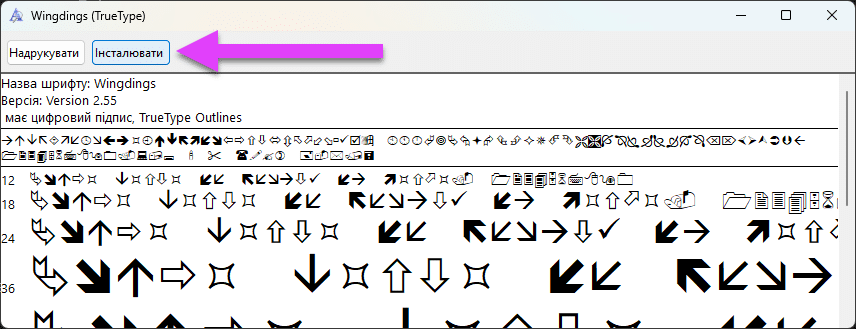
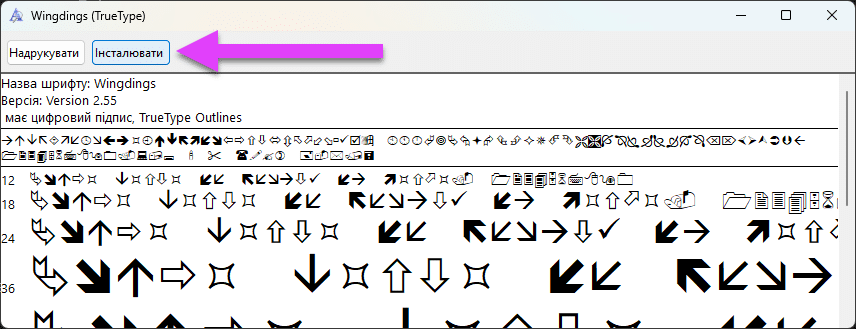
2. Open the file and click the Install button in the top left corner:
How to Install Webdings Font for MetaTrader

After installation, restart your MetaTrader terminal.


Main Info Manual Settings FAQ

Full Changelog User Reviews

この記事は次の言語でもご覧いただけます: English Portuguese Español Deutsch Українська Chinese Русский Français Italiano Türkçe 日本語 한국어 العربية Indonesian ไทย Tiếng Việt


    お待ちください、AIと通信中...


    リスクの警告


    過去の取引実績は将来の結果を保証するものではない。

    外国為替証拠金取引には高いリスクが伴うため、すべての投資家に適しているとは限りません。

    取引ロボットを使用することはかなりのリスクを伴い、初期投資額以上の損失を被る可能性があることに注意してください。

    慎重に行動し、ご自身の財務状況を慎重に判断し、資格を有する専門家の助言を求めることをご検討ください。

    免責事項

    このウェブサイトは、あなたの体験を向上させるためにクッキーを使用しています。このウェブサイトを利用することで、当社のデータ保護方針および免責事項に同意したことになります。
    続きを読む
