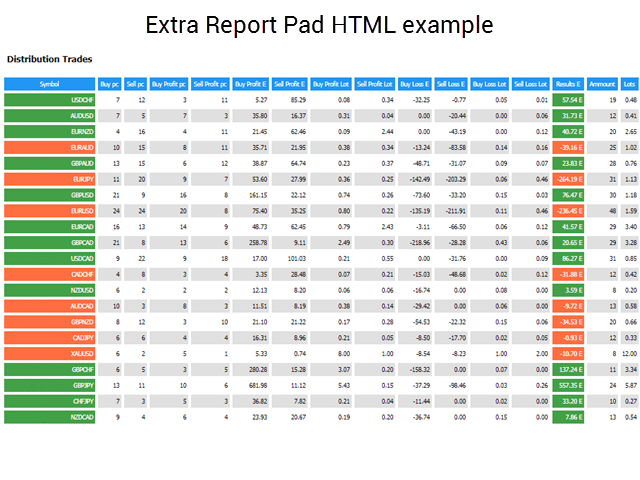
Extra Report Pad 트레이더 일지. 이는 MetaTrader용 거래 계좌 분석을 제공하는 통계 패널입니다.
분석 결과는 실시간으로 차트에 표시됩니다. 다중 통화 거래는 매우 인기가 있습니다. 그러나 거래 수가 많아질수록 각 거래의 수익성을 분석하는 것이 더 어려워집니다. 월별 거래의 전문적인 분석과 거래당 통계 계산은 더욱 도전적인 과제입니다. Extra Report Pad 패널은 계정을 분석하고 HTML, CSV 또는 차트에서 실시간으로 상세한 통계를 준비하는 효율적인 솔루션을 제공합니다. MyFxBook처럼 거래 시스템의 성과를 포괄적으로 이해하려는 경우, 이 목표를 달성하는 데 도움이 되는 여러 도구가 있습니다. Extra Report Pad는 보고서, 통계, MyFxBook, 거래 일지, 계정 분석, 성과 통계, 애널리틱스 (analytics), 그리고 혁신적인 대시보드 (dashboard)를 포함합니다. Extra Report Pad를 활용하면 거래 시스템의 성과를 매우 상세하게 분석하고 강점과 잠재적 약점에 대한 귀중한 통찰력을 얻을 수 있습니다.
신규 트레이더로서 성과를 향상시키려 하거나 경험 많은 트레이더로서 거래 전략을 최적화하려는 경우, 이 Extra Report Pad는 정보에 입각한 결정을 내리고 재무 목표를 달성하는 데 필요한 정보를 제공할 수 있습니다.
Extra Report Pad는 어떻게 작동합니까?
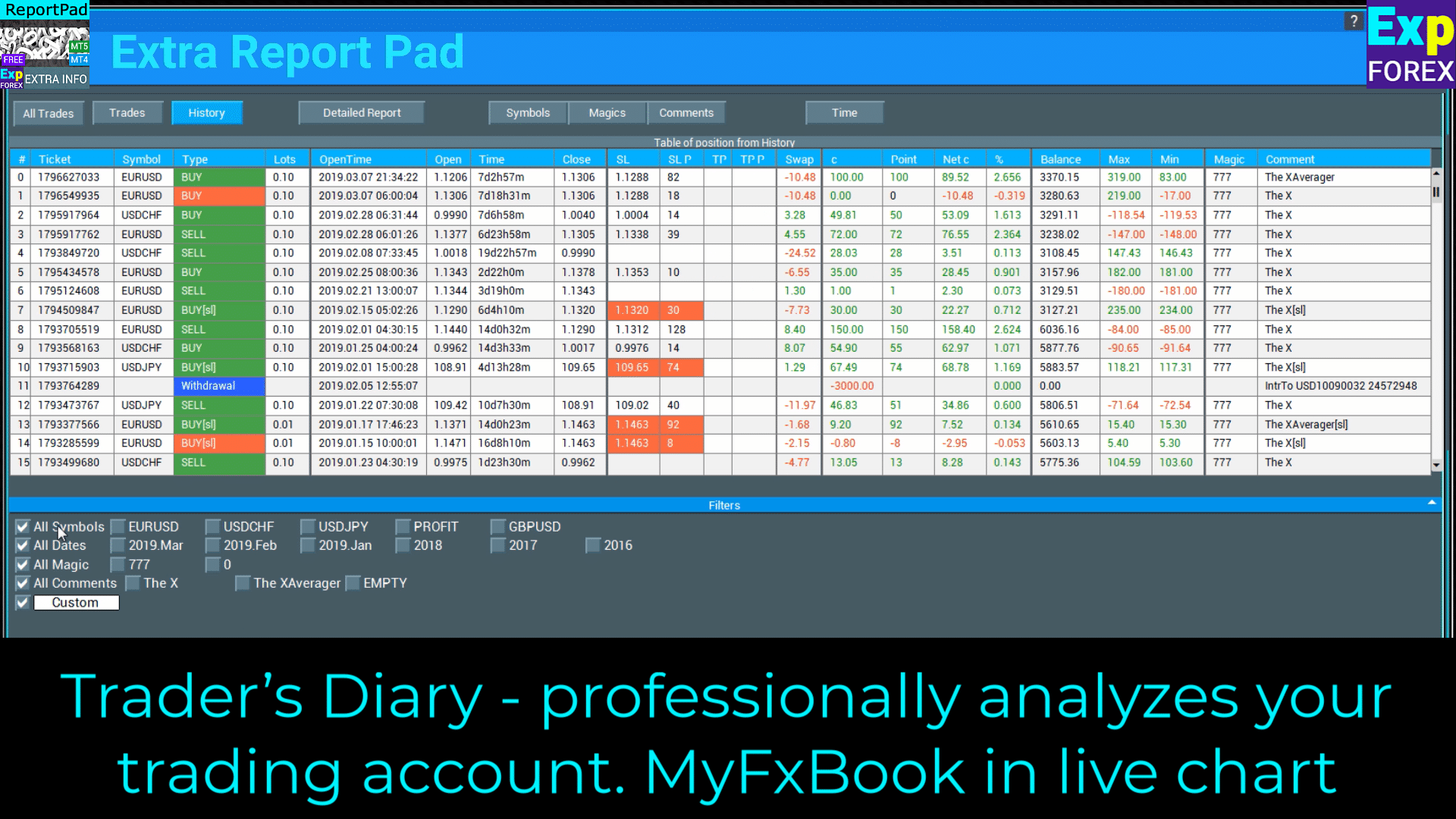
Extra Report Pad 트레이더의 일기 – 귀하의 거래 계정을 전문적으로 분석합니다. 실시간 차트의 MyFxBook
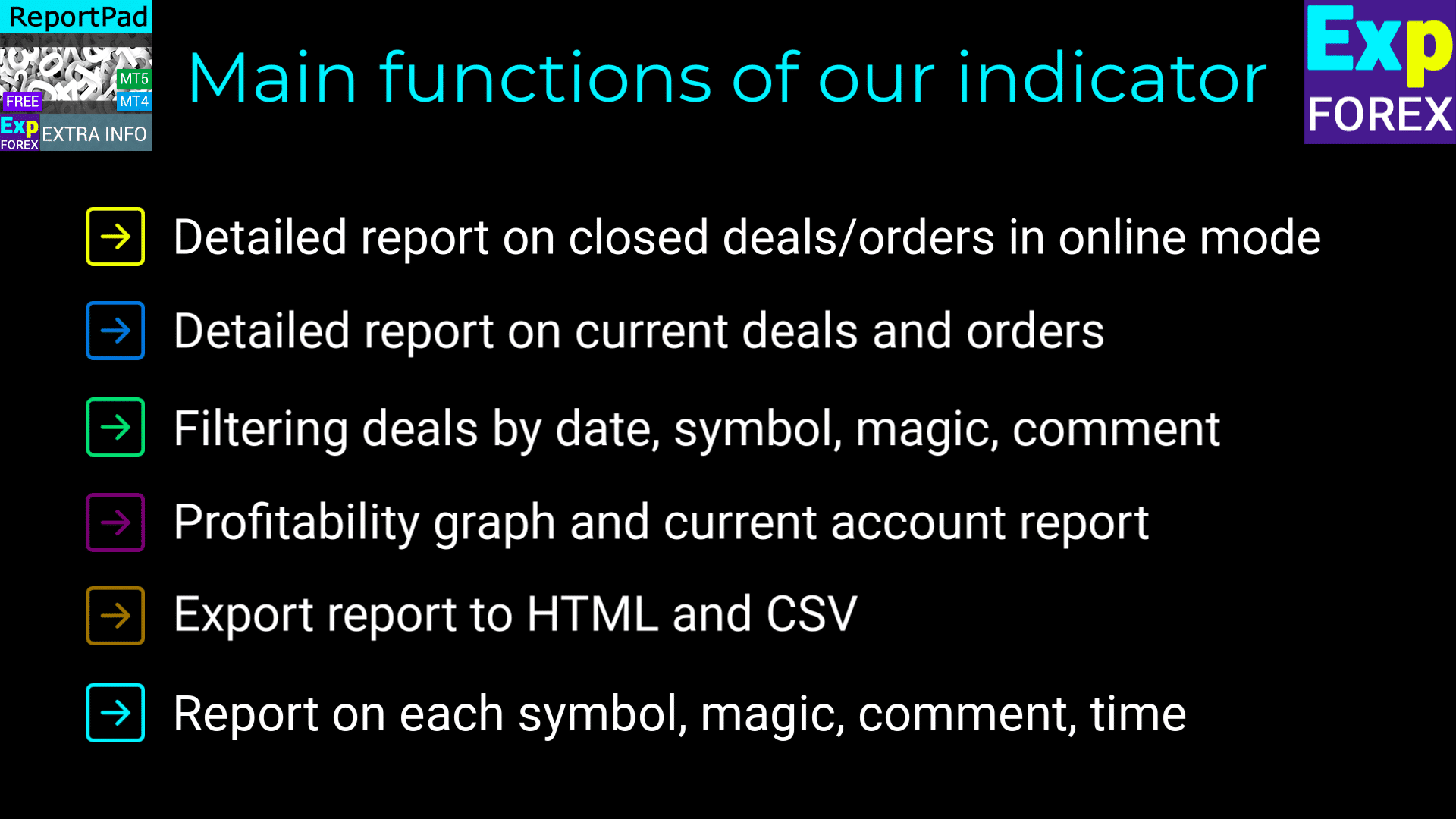
Extra Report Pad의 주요 기능-
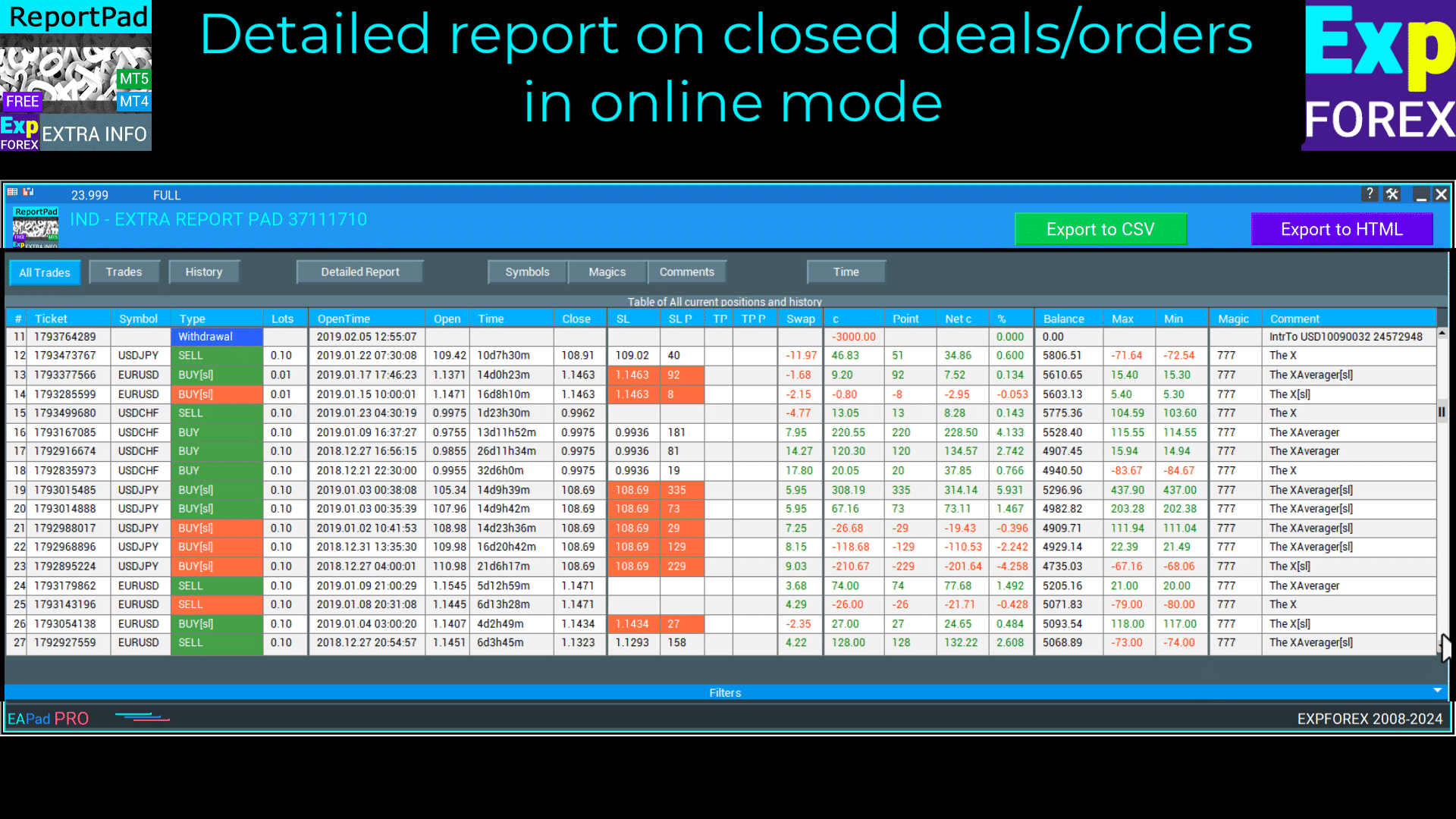
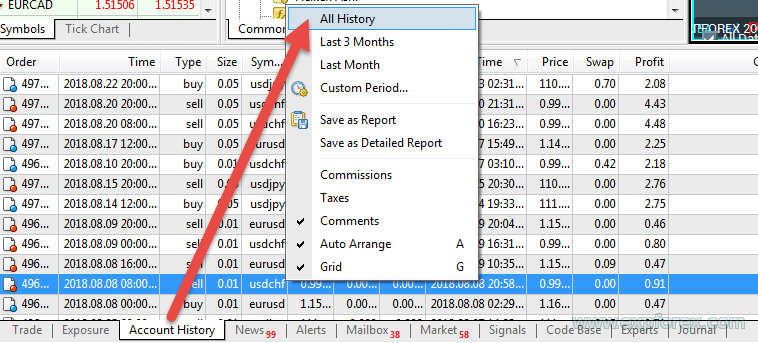
Extra Report Pad 온라인 모드에서 닫힌 거래/오더에 대한 상세 보고서
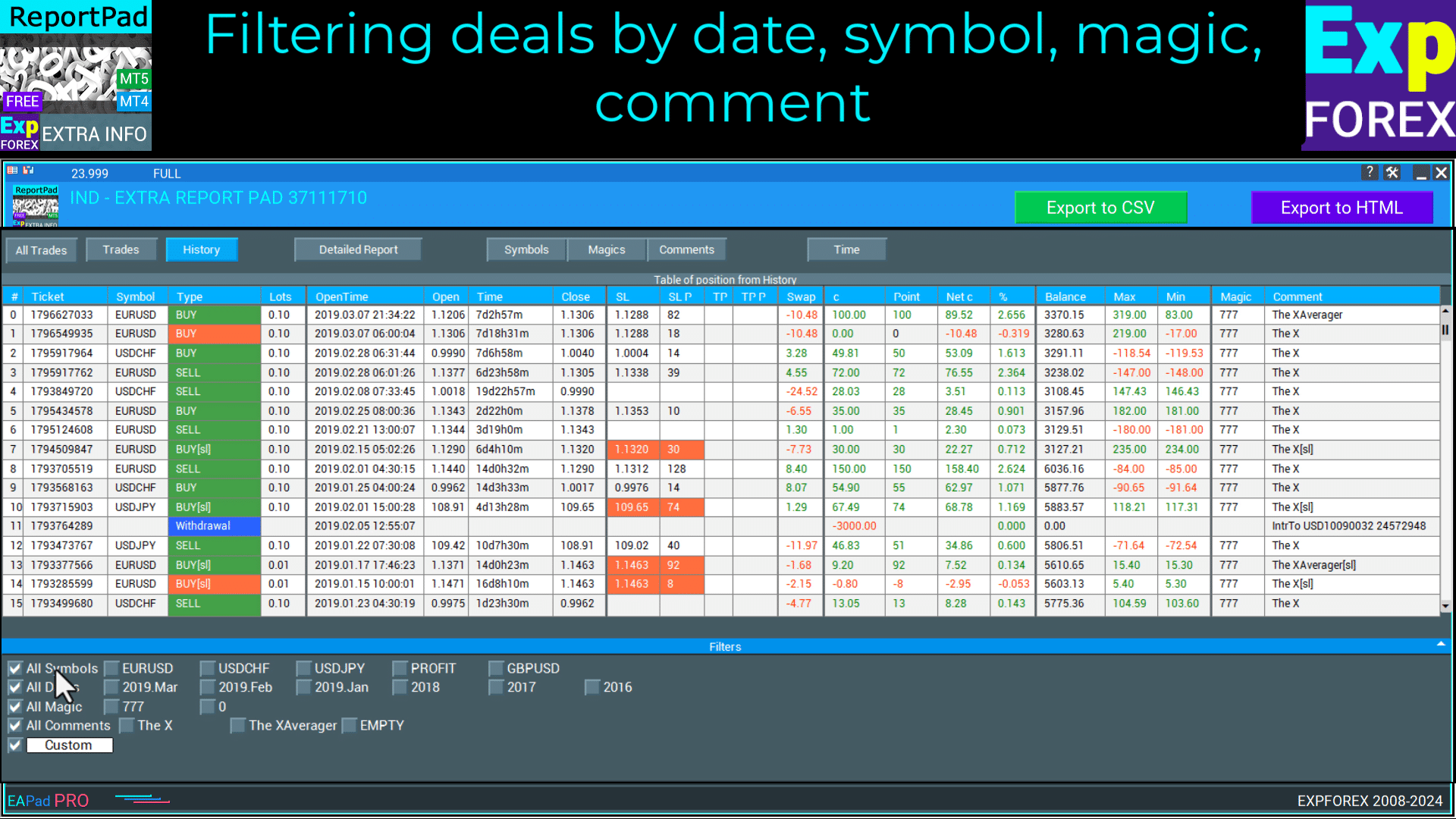
Extra Report Pad 날짜, 심볼 (symbol), 매직 (magic), 댓글 (comment)로 거래 필터링
cbarryftmo
At last, I've discovered exactly what I needed! I'd been searching for a tool to assess the performance of various EAs over time, but couldn't find one. The program I downloaded earlier lacked the feature to label prices traded by specific EAs. This tool fulfills my requirement perfectly. I'm extremely grateful for the expertise behind its development and the superior ability to download information. Thank you so much!
This indicator is amazing. It also has the max upside watermark and the lowest drawdown that was in profit per trade. Compare it to the actual profit or loss, then use an EA like Account Protector and tell it to take profit or stop loss at the average high watermark and stop loss at at the lowest above the largest drawdowns. It will increase your profits and mimimize your losses. just review your trades daily or weekly and you will find this tool invaluable. And the reports are far better than Metatraders. And it gives you a report analysis of all your trades with win and lose rate, profit ration, lowest overall drawdown, etc. You can also filter your trades by comment or magic number to get a drilled down deeper insight. Great job author!
Jcb Mlwijk
Excellent reporting functionality that provides you with detailed insights into their trading performance. The tool generates trade history reports, including key metrics such as profit/loss analysis, drawdown, and risk exposure.
Fabrizio Malavasi
This reporting app it's a very useful tool to analyse the trades order history.The "Time" button that show the profit/entry along the time It's interesting too. It has a very nice graphic form. You made as usual an excellent job!
Thanks a lots!
Yusuf Mansawala
It's a useful tool for Fund Mangers and Clients trading with multiple signals or multiple copy trading services, as it can sort out your account statement into a powerful decision making tool.
hwschmidt
Tolles Tool. Sehr viele Informationen die man bisher nicht hatte. Für mich besonders gut weil ich die Daten jetzt besser nach Excel übertragen kann ohne das die Formatierung leidet. Danke
월별 기간 동안 테스트한 후, 우리는 보고서를 수동으로 분석하여 어떤 쌍이 수익성이 있는지, 그리고 데이터를 기반으로 시스템을 더욱 정교하게 조정해야 했습니다.
우리는 이 문제에 대한 해결책을 찾았고, 계좌를 자동으로 전문적으로 분석 (Professionally Analyze)하고 실시간 (Real-Time)으로 가능한 한 자세하게 정보를 표시할 수 있는 EXTRA REPORT PAD 지표를 만들었습니다!
장점
우리의 지표 (Indicator)는 Forex 거래를 실시간으로 분석하도록 설계되었습니다. MetaTrader 터미널에서 추출할 수 있는 모든 데이터와 종합적인 통계를 활용하세요!
MyFxBook Mini가 터미널 창에 통합되어 항상 손끝에 있습니다!
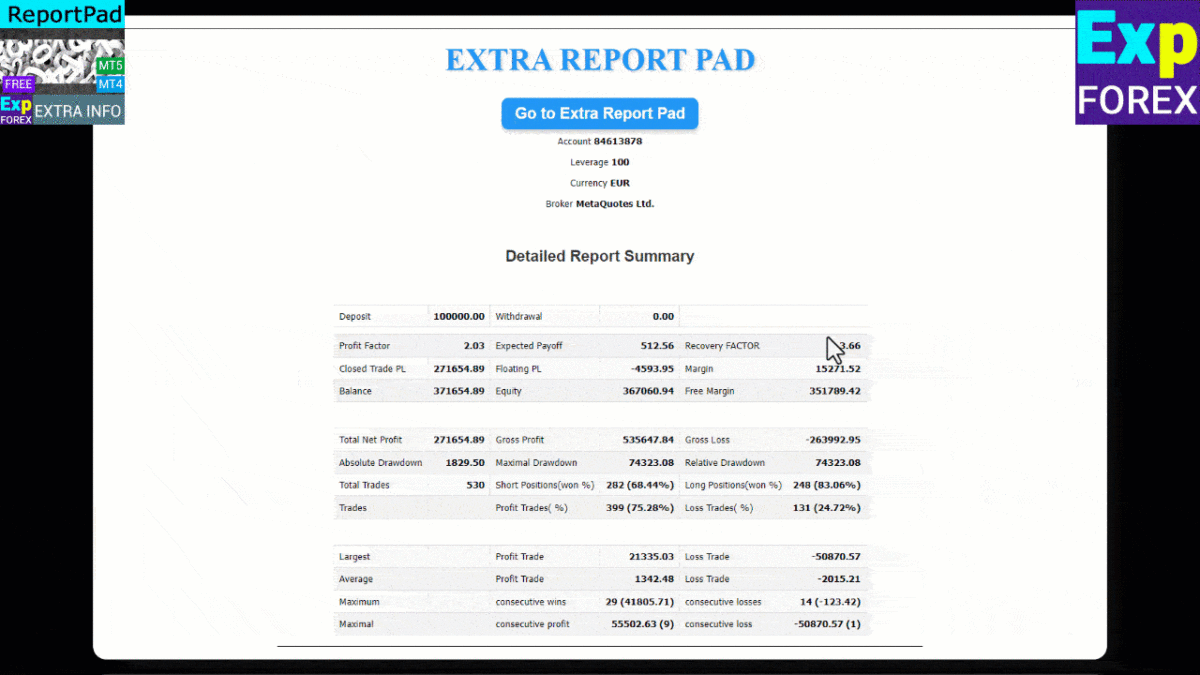
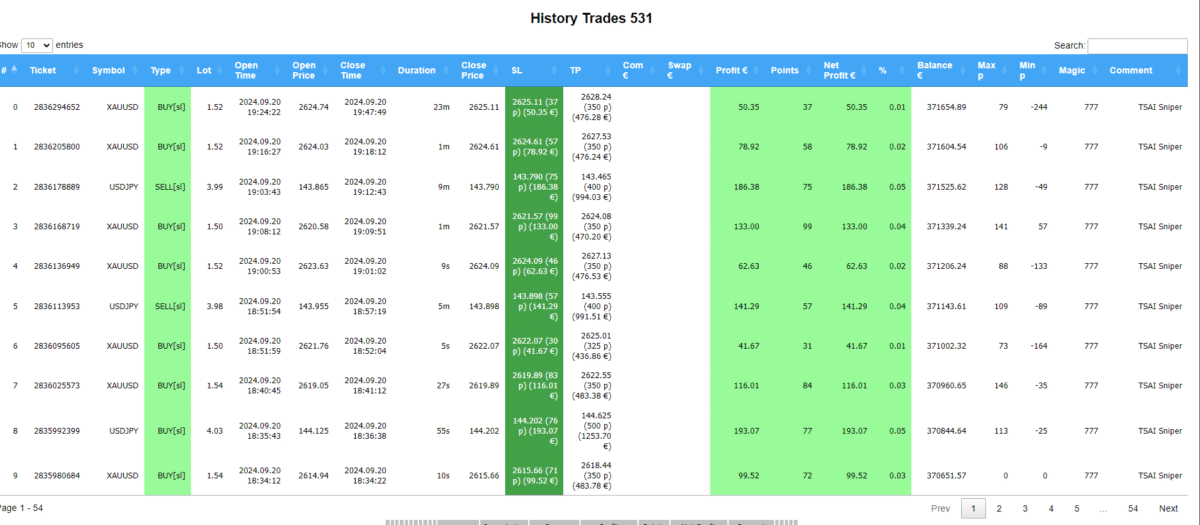
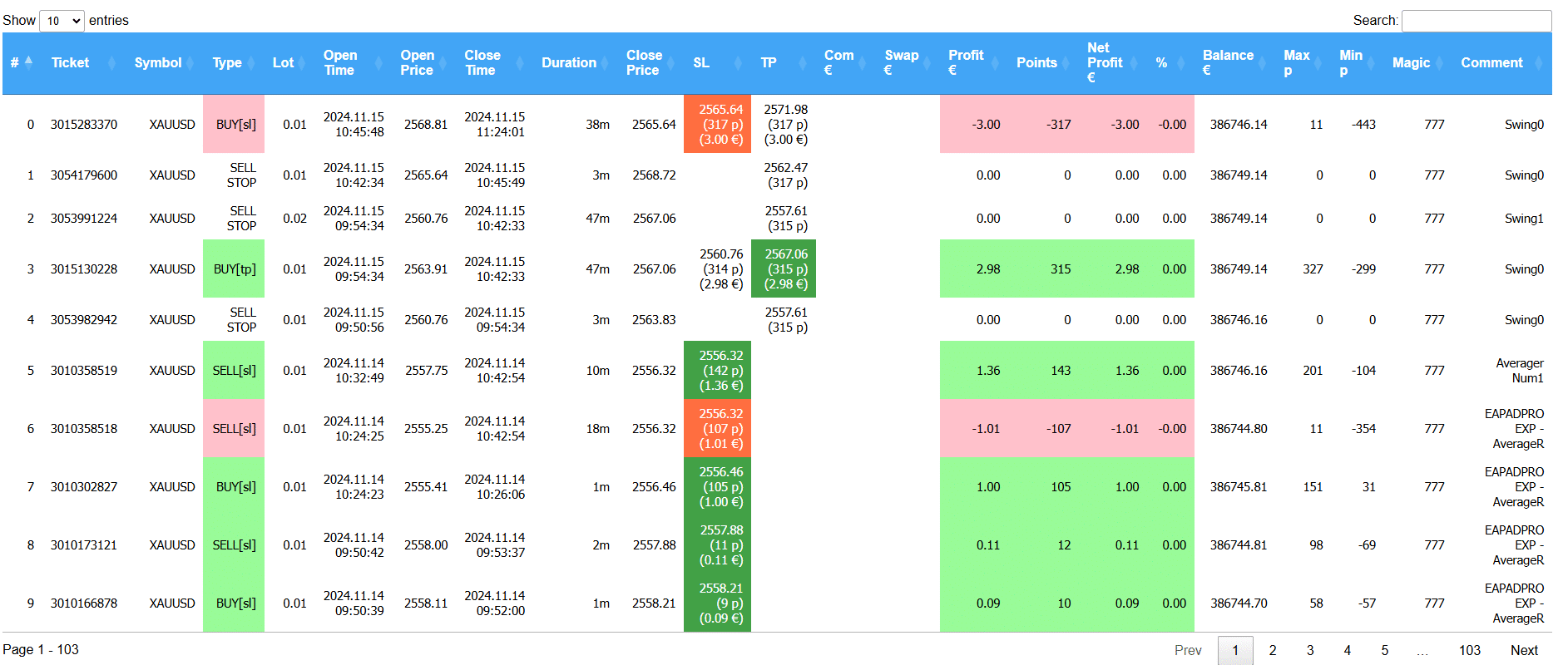
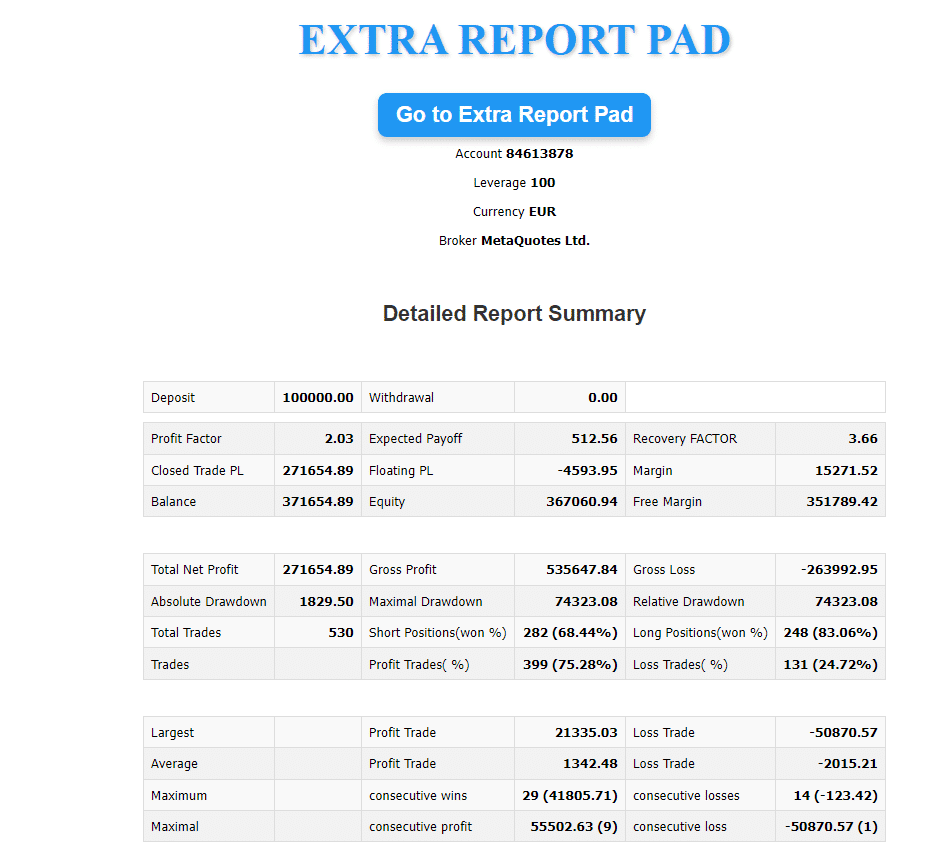
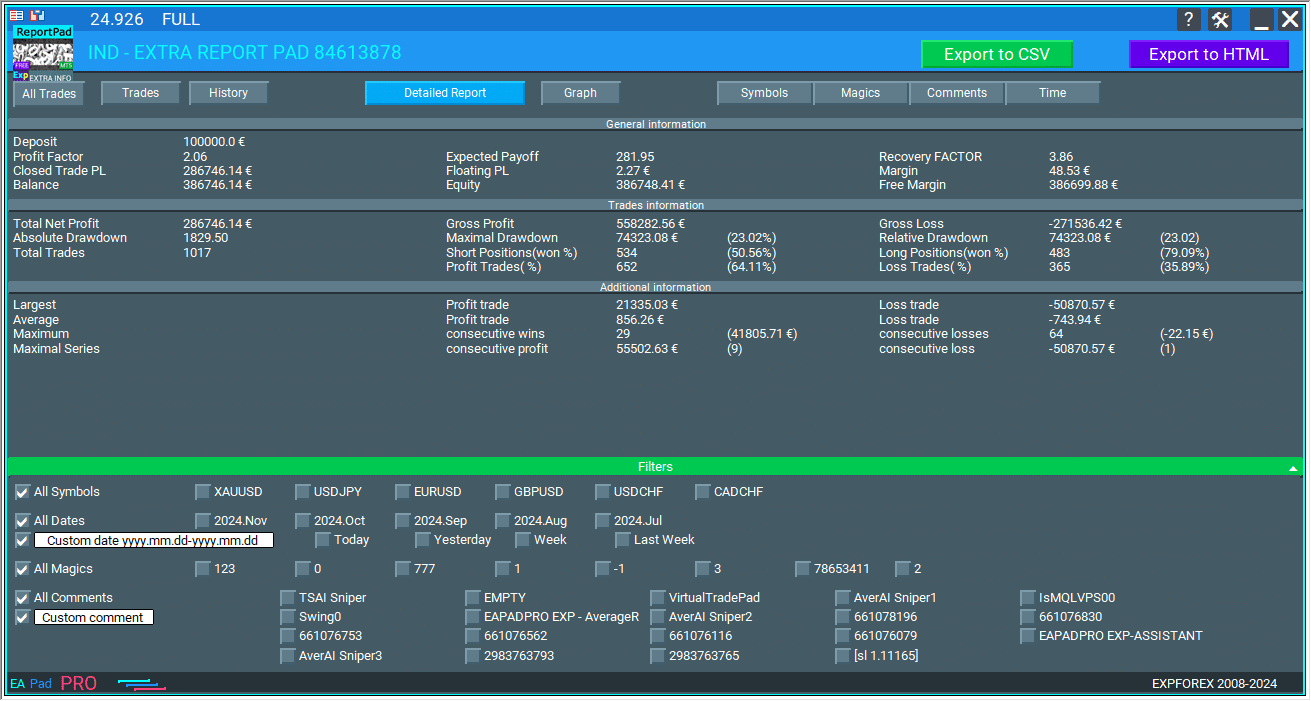
HTML로 업로드된 자세한 보고서는 표준 MT 보고서보다 500% 더 많은 정보를 포함합니다.
구버전 MetaTrader 상세 보고서
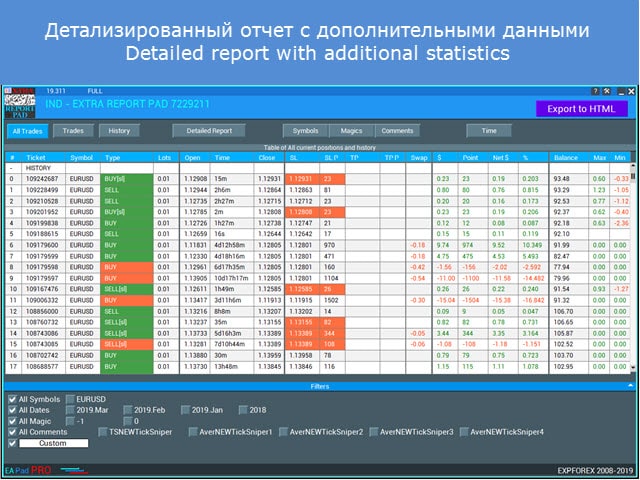
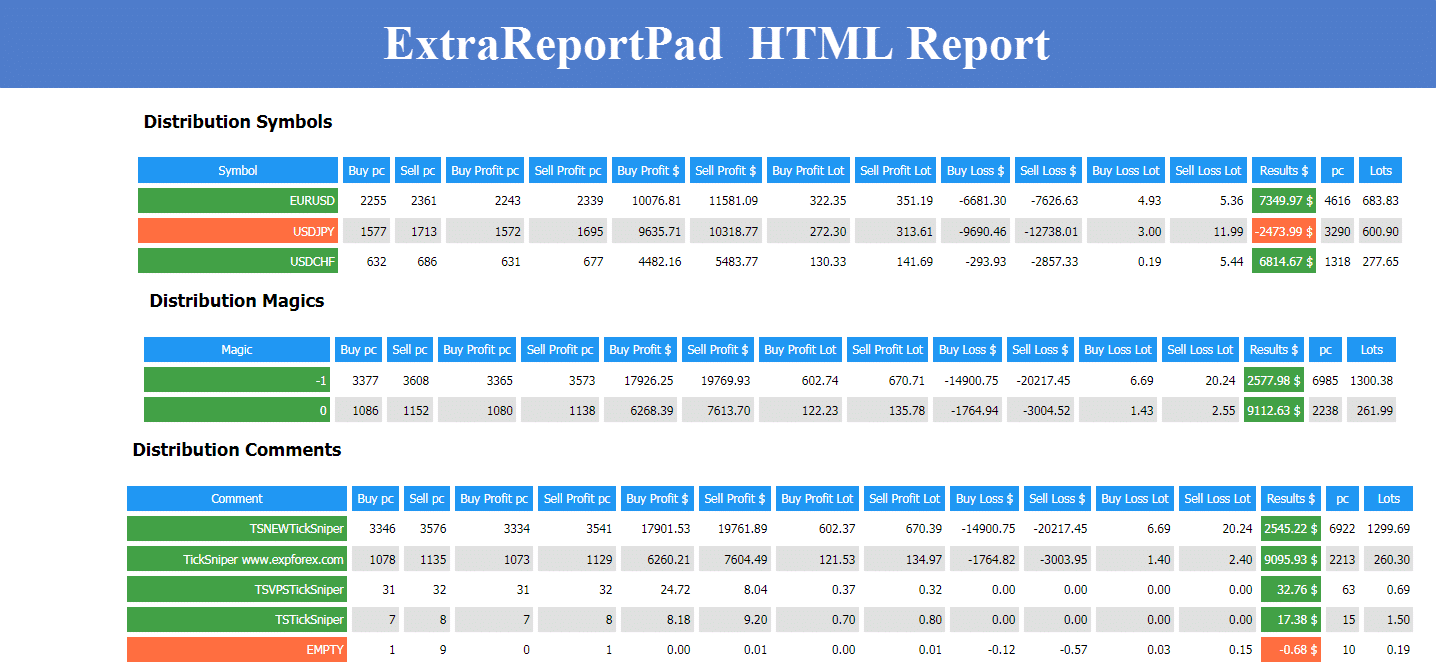
Extra Report Pad에서 생성된 새로운 상세 보고서
HTML 및 CSV로 내보내기
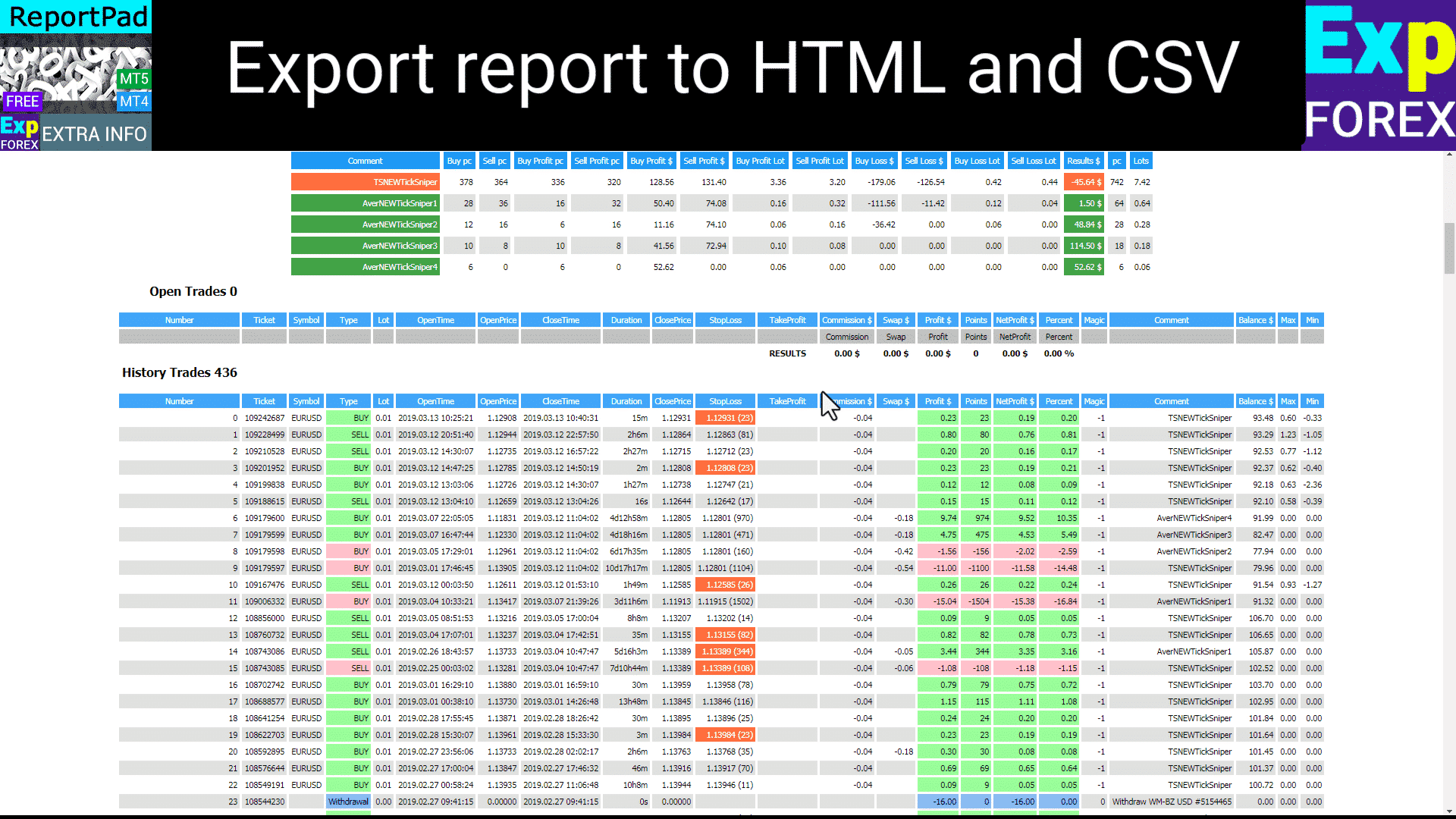
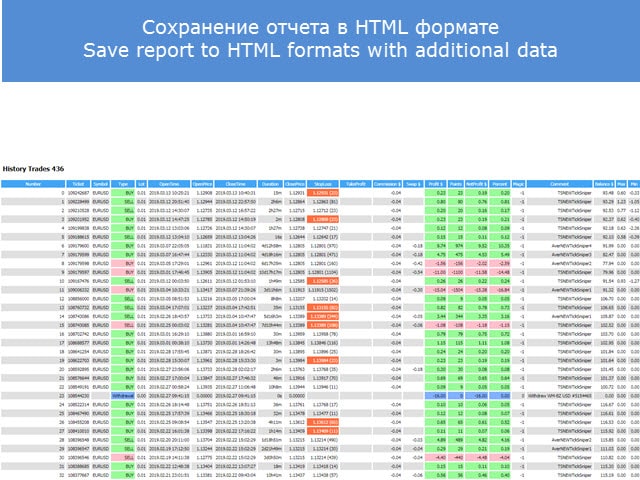
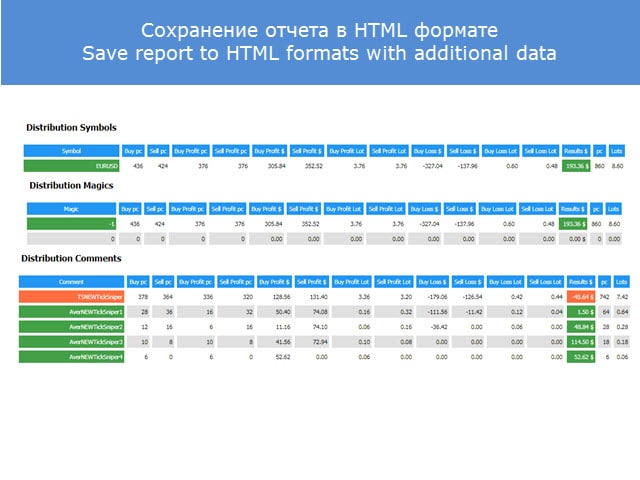
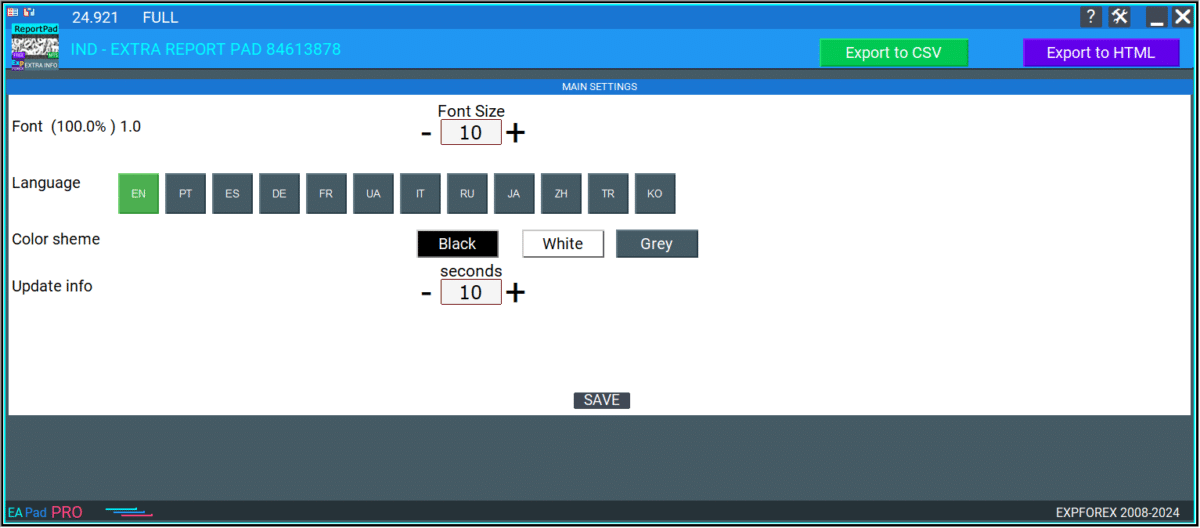
우리는 Extra Report Pad에 HTML로 내보내기 (EXPORT to HTML) 버튼을 추가하여 차트의 전체 보고서를 별도의 HTML 파일로 내보낼 수 있게 했습니다. 모든 거래는 패널에서 사용된 필터에 따라 필터링됩니다. 예를 들어, 특정 통화쌍 하나, 특정 매직 넘버, 또는 특정 월만 선택할 수 있습니다. 생성된 보고서에는 필터링된 데이터만 포함됩니다.
HTML 상세 보고서를 열려면:
데이터 폴더를 엽니다.
보고서 파일은 다음 폴더에 생성됩니다: YOUR TERMINAL \ MQL4 \ Files \ EXTRAREPORTPAD \ EXTRAREPORTPAD AccountNumber.html
HTML 예시:
CSV 예시:
탭 및 컨트롤
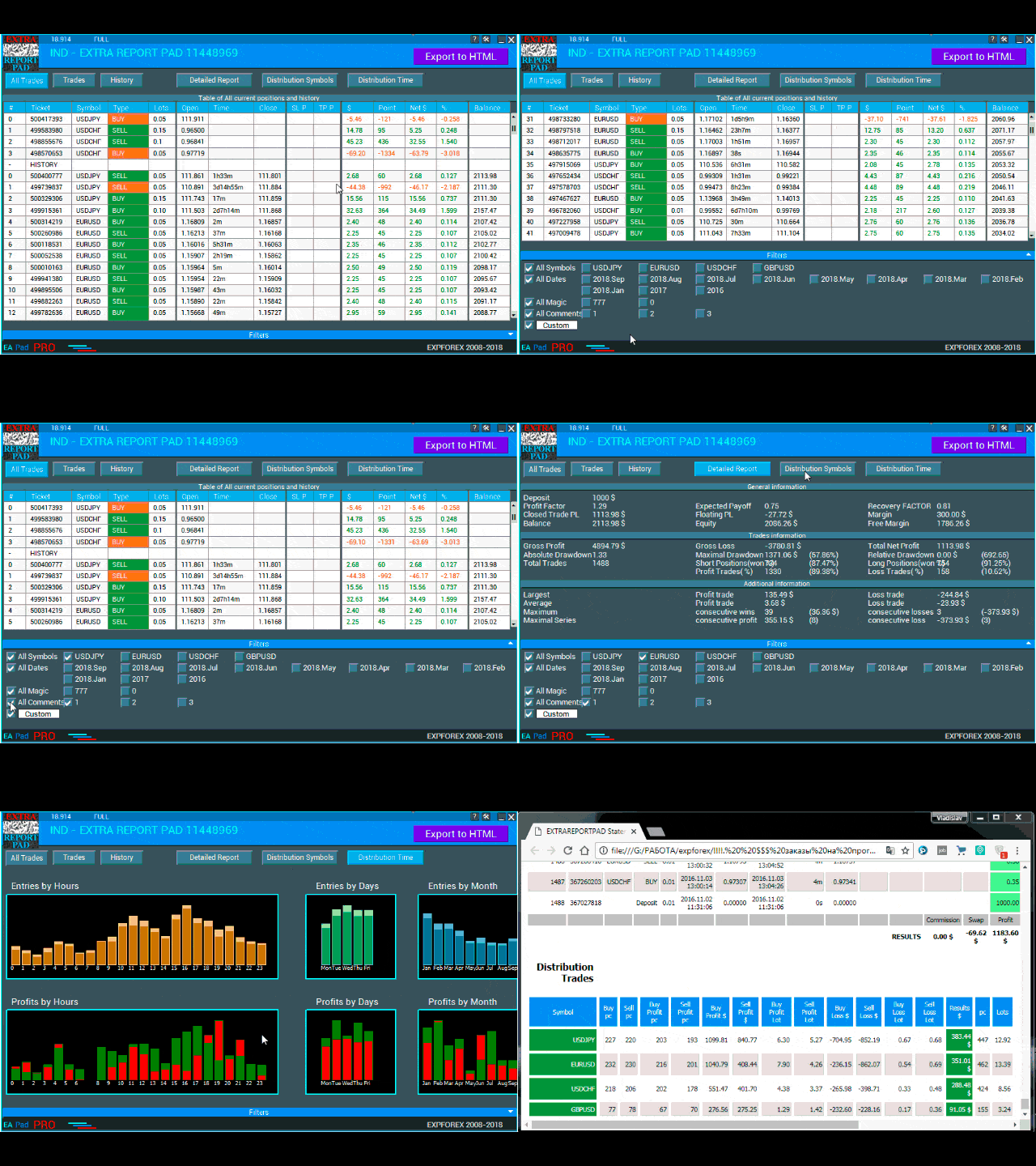
현재 우리 패널은 9개의 탭으로 구성되어 있습니다:
TRADES – 현재 열려 있는 거래를 표시합니다.
HISTORY – 과거의 종료된 거래를 표시합니다.
ALL TRADES – 열려 있는 거래와 종료된 거래 모두를 표시합니다.
REPORTS – 거래 계좌의 종료된 거래에 대한 자세한 보고서를 보여줍니다.
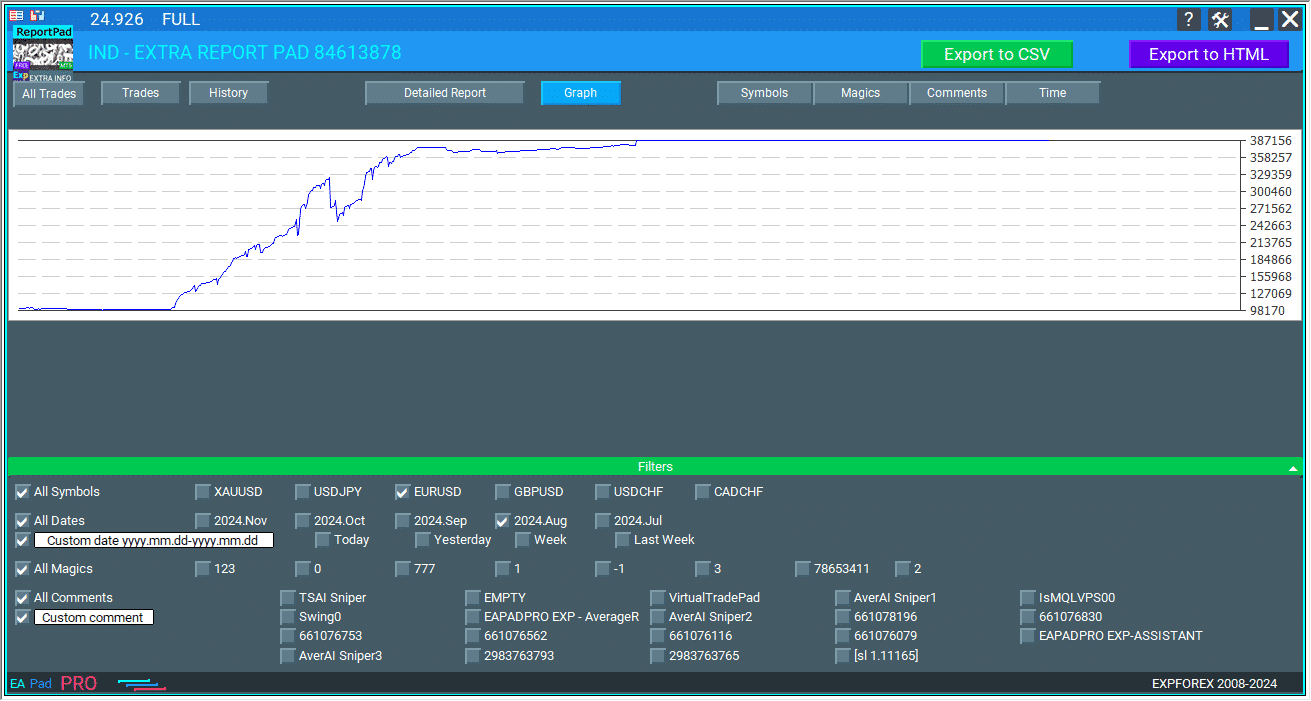
GRAPH PROFIT CHART – 시간에 따른 수익 추세를 시각적으로 나타내어 전체 거래의 수익성을 평가하고 거래 성과의 패턴이나 변동을 볼 수 있습니다.
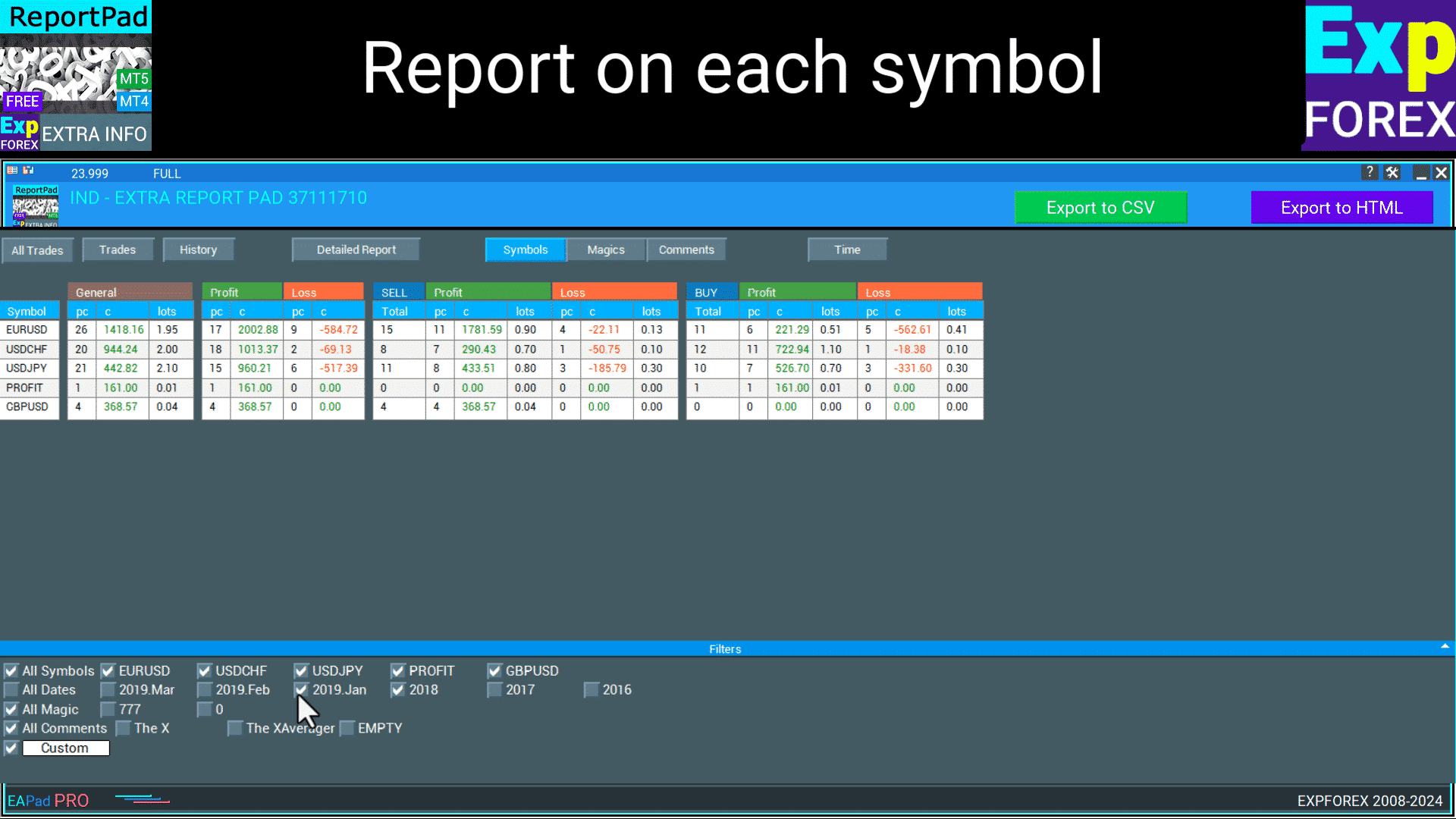
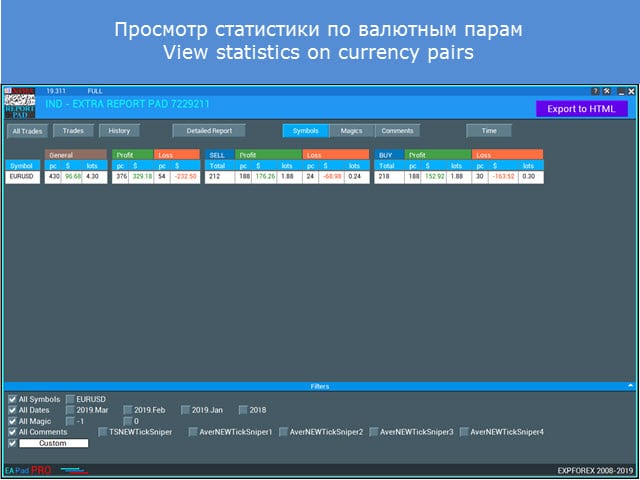
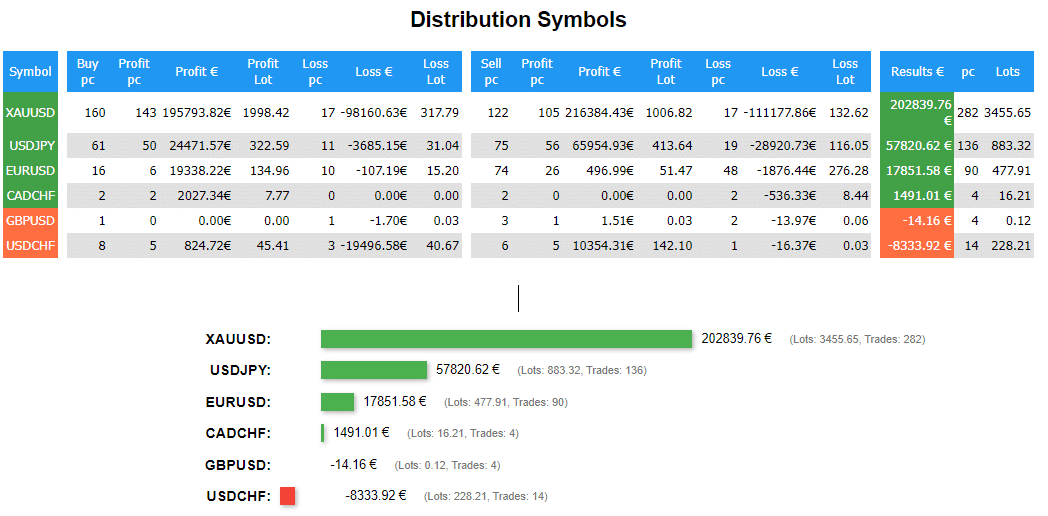
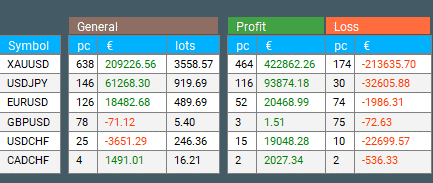
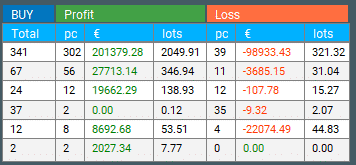
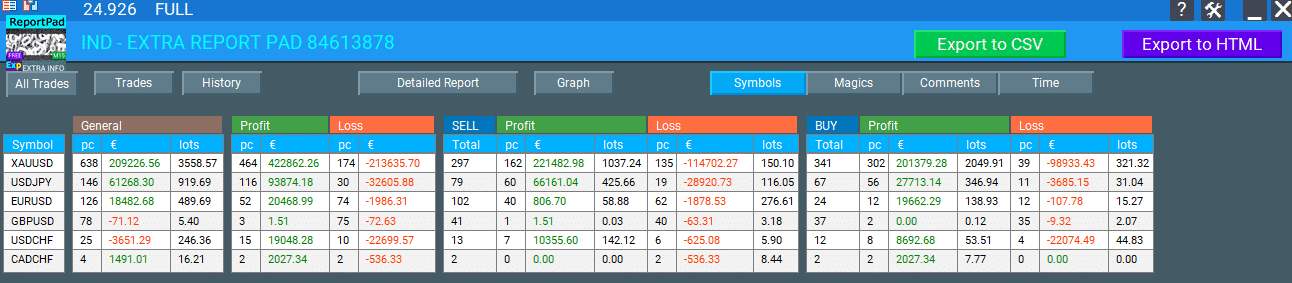
DISTRIBUTION Symbols – 총 수, 그리고 각 통화쌍별로 수익성 있는 거래의 수와 함께 BUY 및 SELL 거래의 분포를 보여줍니다. 또한 각 통화쌍별로 수익성 있는 거래의 분포, 총 수익, 롯 크기와 각 심볼별로 손실 거래의 분포를 표시합니다.
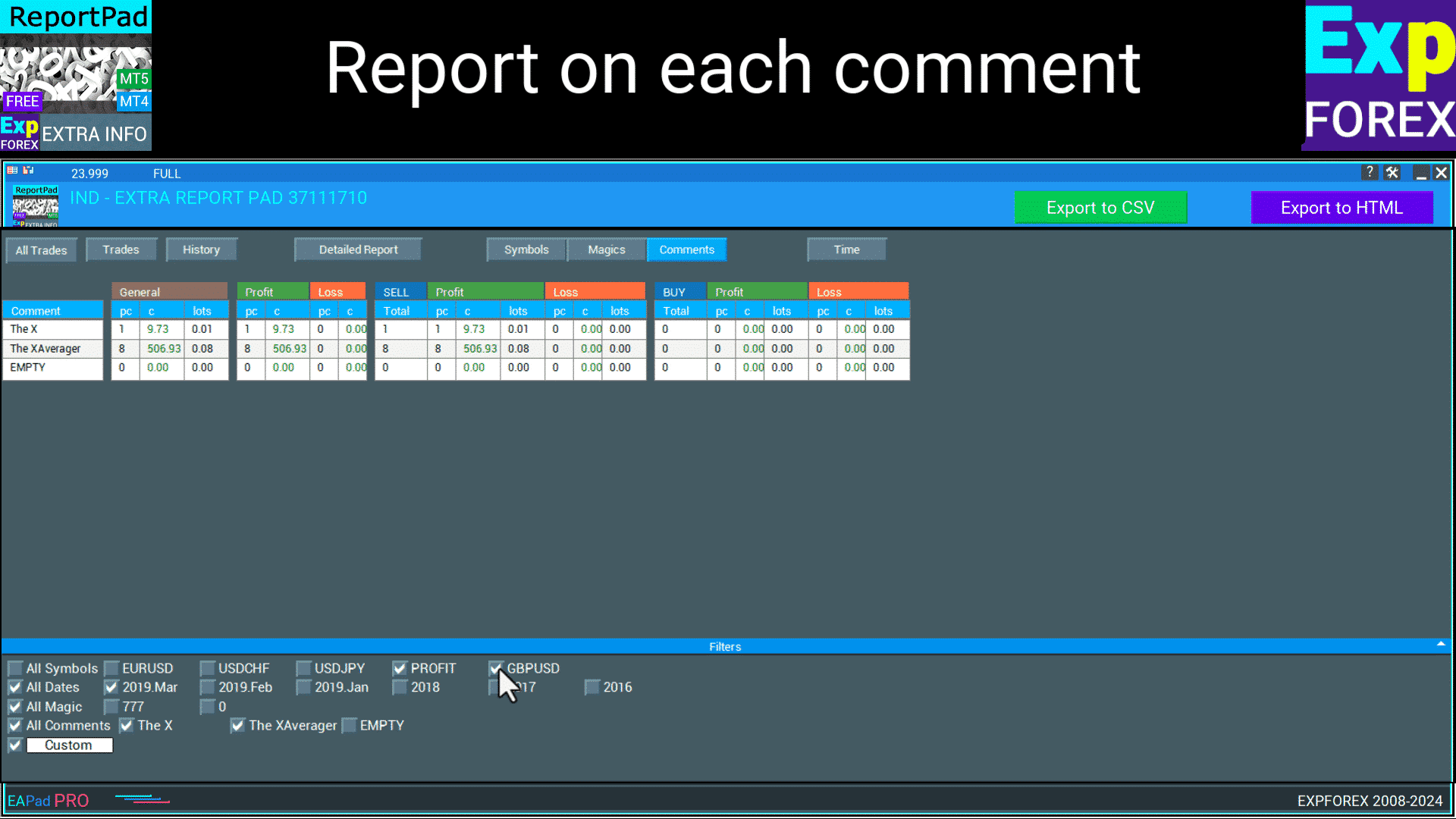
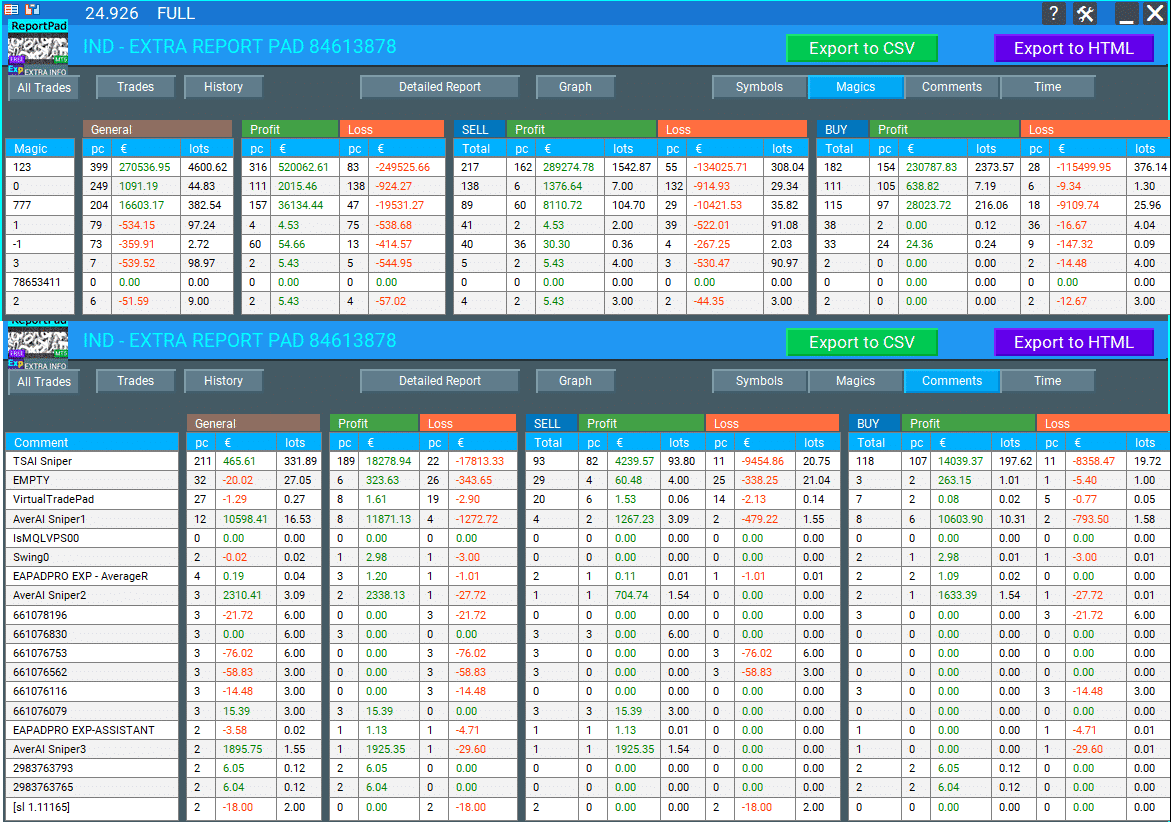
DISTRIBUTION by Comments – 특정 댓글에 따라 분류된 거래의 분포를 보여줍니다. 여기에는 BUY 및 SELL 거래의 총 수, 수익성 있는 거래, 총 수익, 각 고유 댓글을 기반으로 한 롯 크기가 포함됩니다. 또한 각 댓글 범주별로 손실 거래의 분포를 보여줍니다.
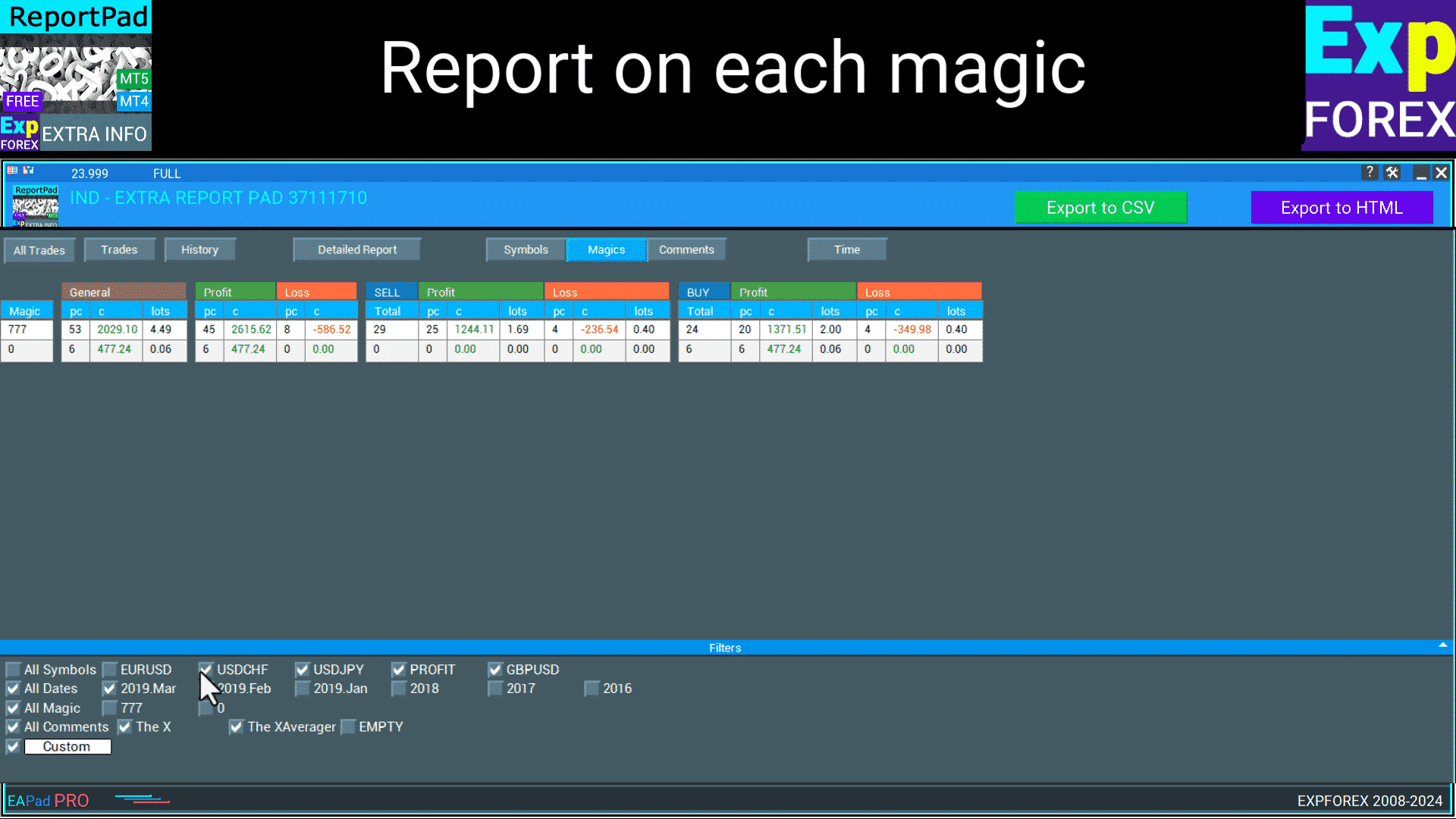
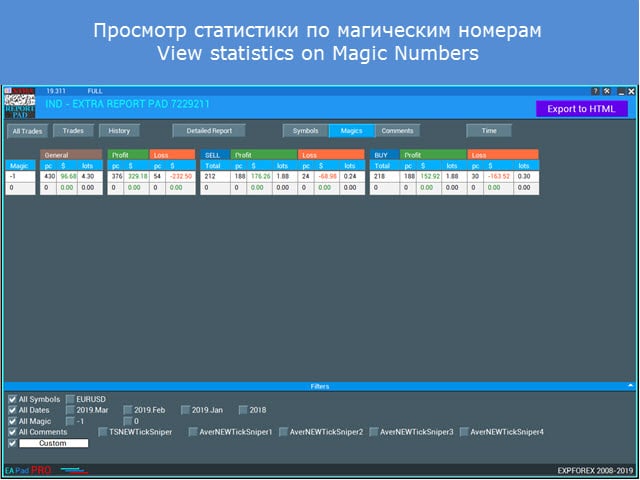
DISTRIBUTION by Magic Numbers – 매직 넘버에 따라 분류된 거래의 분포를 보여주며, 각 매직 넘버별로 BUY 및 SELL 거래의 총 수, 수익성 있는 거래, 총 수익, 롯 크기를 상세히 보여줍니다. 또한 각 매직 넘버별로 손실 거래의 분포를 표시합니다.
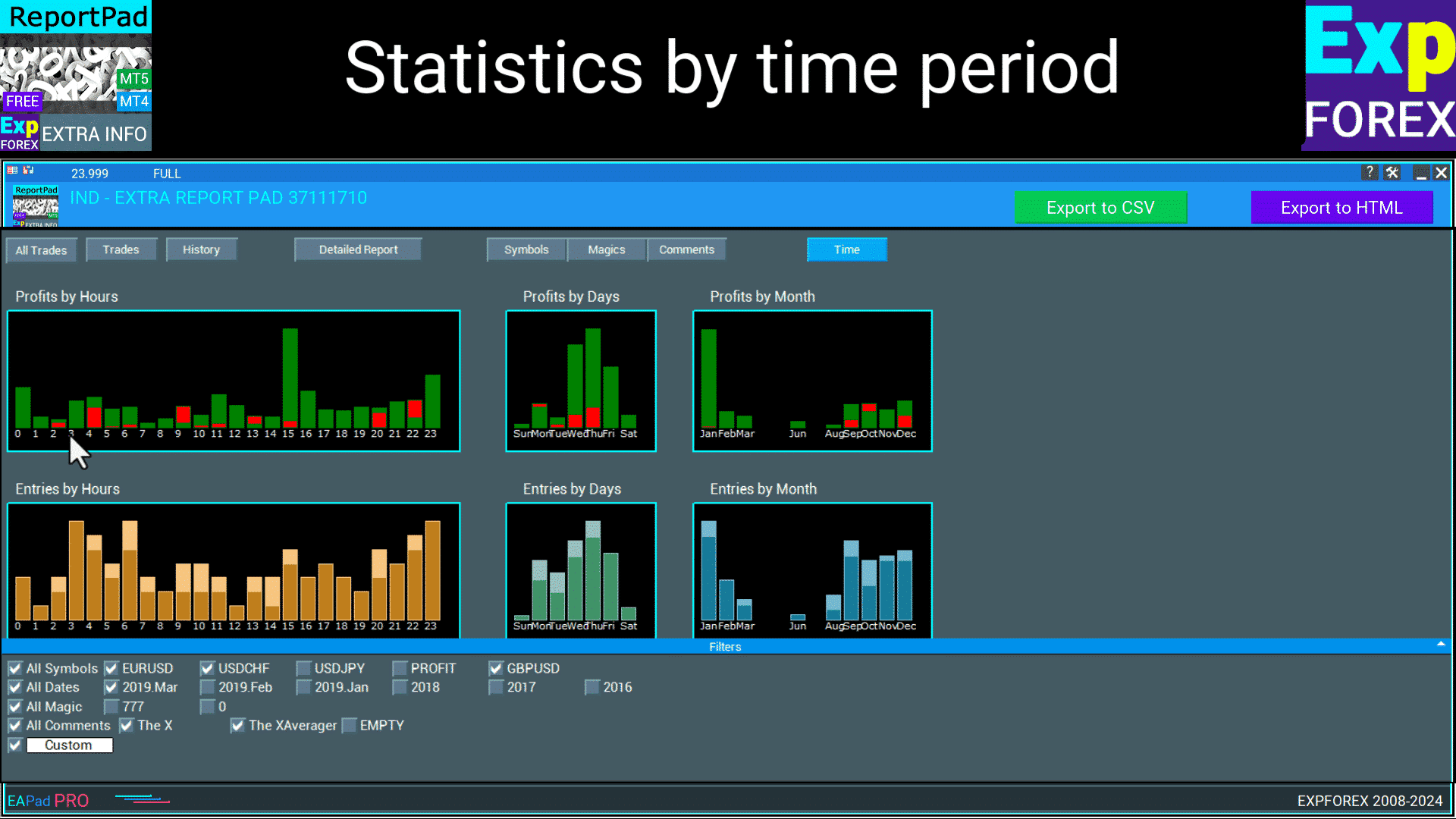
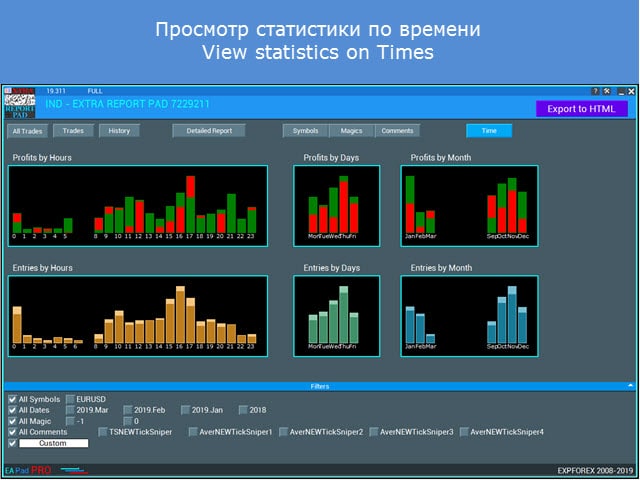
DISTRIBUTION Time – 거래 수와 함께 시간별, 요일별, 월별로 수익 또는 손실을 표시합니다. 열 이름을 보면 각 범주의 데이터를 얻을 수 있습니다.
답변: Extra Report Pad은(는) 거래 계좌를 효과적으로 분석하도록 설계된 전문 도구입니다. 이는 실시간으로 포괄적인 통계 분석을 제공하여 트레이더가 MyFxBook과 같은 표준 도구에 비해 거래 성과를 더 정확하게 모니터링하고 평가할 수 있게 합니다.
Extra Report Pad는 MyFxBook과 어떻게 비교됩니까?
답변: MyFxBook이 거래 계좌에 대한 실시간 차트 분석을 제공하는 반면, Extra Report Pad는 HTML 보고서를 통해 500% 더 많은 정보와 함께 보다 상세한 분석을 제공합니다. 이는 열린 거래와 닫힌 거래를 분석할 뿐만 아니라 심층적인 통계 데이터와 월별 성과 통찰력을 제공하여 전문 트레이더에게 더 우수한 선택이 됩니다.
Extra Report Pad를 사용할 때의 주요 이점은 무엇입니까?
답변: Extra Report Pad의 주요 이점은 다음과 같습니다:
실시간 분석: 최신 통계 및 데이터를 제공합니다.
포괄적인 보고서: 광범위한 정보가 포함된 상세한 보고서를 생성합니다.
맞춤 설정: 심볼, 날짜, 매직 넘버 및 코멘트로 필터링을 허용합니다.
사용 용이성: MetaTrader 터미널에 통합되어 원활하게 접근할 수 있습니다.
향상된 통계: 표준 보고서에 비해 더 심층적인 분석을 제공합니다.
Extra Report Pad를 사용하여 거래 데이터를 어떻게 내보낼 수 있습니까?
답변: Extra Report Pad는 거래 데이터를 HTML 및 CSV 형식으로 내보낼 수 있습니다. EXPORT to HTML 버튼을 클릭하면 선택한 기준(예: 특정 통화 쌍, 매직 넘버 또는 월별)에 따라 필터링된 상세한 보고서를 생성할 수 있습니다. 내보낸 파일은 YOUR TERMINAL \ MQL4 \ Files \ EXTRAREPORTPAD 디렉토리에 저장되어 MetaTrader 플랫폼 외부에서 거래 성과를 쉽게 접근하고 검토할 수 있습니다.
Extra Report Pad에서 사용할 수 있는 필터 유형은 무엇입니까?
답변: Extra Report Pad는 분석을 사용자 지정하기 위해 여러 가지 필터 옵션을 제공합니다:
심볼별 필터: 특정 통화 쌍을 선택합니다.
날짜별 필터: 특정 거래 기간을 선택합니다.
매직별 필터: 매직 넘버를 기반으로 거래를 필터링합니다.
코멘트별 필터: 코멘트로 거래를 정렬합니다.
맞춤 날짜 및 코멘트: 보다 정밀한 분석을 위해 개인화된 필터를 생성합니다.
이러한 필터는 거래 성과의 특정 측면을 분리하고 조사하는 데 도움이 됩니다.
Extra Report Pad는 여러 통화 쌍을 동시에 처리할 수 있습니까?
답변: 예, Extra Report Pad는 여러 통화 쌍을 동시에 관리하고 분석하도록 설계되었습니다. 이는 여러 통화를 동시에 거래하는 현대적인 거래 전략에 필수적이며, 여러 거래를 처리하는 복잡성을 단순화하여 상세하고 조직적인 통계 데이터를 제공합니다.
Extra Report Pad에서 사용할 수 있는 언어는 무엇입니까?
답변: Extra Report Pad는 다양한 사용자 기반을 만족시키기 위해 여러 언어를 지원합니다. 사용 가능한 언어는 다음과 같습니다:
영어
우크라이나어
포르투갈어
스페인어
이탈리아어
프랑스어
독일어
중국어
일본어
한국어
터키어
이 다국어 지원은 다양한 지역의 트레이더들이 도구를 효과적으로 활용할 수 있도록 보장합니다.
Extra Report Pad는 표준 MetaTrader 보고서에 비해 거래 분석을 어떻게 향상시키나요?
답변: 표준 MetaTrader 보고서는 개별 거래, 수익성 있는 통화 쌍, 월별 통계에 대한 상세한 데이터를 제공하지 않습니다. Extra Report Pad는 이러한 한계를 보완하여 다음과 같은 기능을 제공합니다:
상세 거래 데이터: 거래의 개별 정보, 열림/닫힘 시간, 가격, 이익/손실 등을 포함한 포괄적인 정보.
월별 분석: 추세 분석을 개선하기 위해 거래 성과를 월별로 분류.
고급 통계: 이익 계수, 복구 계수, 드로다운 등과 같은 지표를 계산.
실시간 업데이트: 데이터를 10초마다 지속적으로 업데이트하여 트레이더에게 최신 정보를 제공합니다.
이러한 향상된 기능은 트레이더가 거래 활동을 보다 철저하고 전문적으로 분석할 수 있도록 합니다.
Extra Report Pad는 MetaTrader와 쉽게 설치 및 통합됩니까?
답변: 예, Extra Report Pad는 MetaTrader 터미널과 원활하게 통합되도록 설계되었습니다. 설치는 MQL4(5) \ Indicators 디렉토리에 지표 파일을 배치하는 것을 포함합니다. 설치가 완료되면 도구가 MetaTrader 내에 통합된 패널로 나타나 거래 워크플로우를 방해하지 않고 모든 기능에 쉽게 접근할 수 있습니다.
Extra Report Pad 사용자에게 제공되는 지원 및 리소스는 무엇입니까?
답변: Extra Report Pad 사용자들은 다음과 같은 다양한 지원 및 리소스에 접근할 수 있습니다:
포괄적인 문서: 지표 기능 사용에 대한 상세한 가이드 및 지침.
다운로드 가능한 파일:파일 섹션에서 쉽게 접근 가능한 지표 파일.
고객 지원: 기술 문제나 문의 사항에 대한 지원.
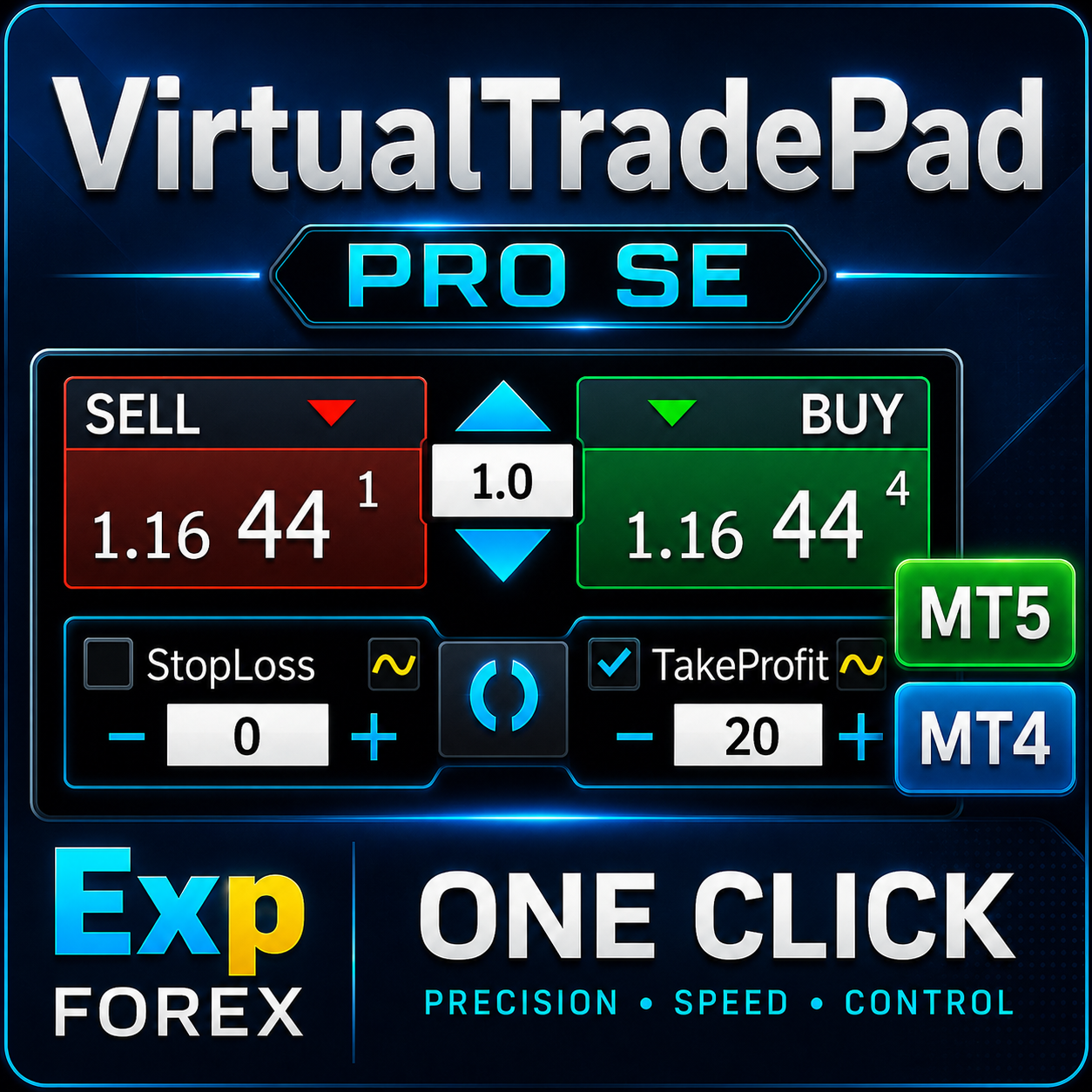
커뮤니티 리소스:VIRTUALTRADEPAD 및 EAPADPRO와 같은 관련 제품 및 추가 도구에 대한 링크로 향상된 거래 분석을 제공합니다.
또한, 사용자들은 Thank You 버튼을 클릭하거나 다
변경 기록 Extra Report Pad
ChangelogUpdate history will be loaded when this tab is opened.
This indicator is amazing. It also has the max upside watermark and the lowest drawdown that was in profit per trade. Compare it to the actual profit or loss, then use an EA like Account Protector and tell it to take profit or stop loss at the average high watermark and stop loss at at the lowest above the largest drawdowns. It will increase your profits and mimimize your losses. just review your trades daily or weekly and you will find this tool invaluable. And the reports are far better than Metatraders. And it gives you a report analysis of all your trades with win and lose rate, profit ration, lowest overall drawdown, etc. You can also filter your trades by comment or magic number to get a drilled down deeper insight. Great job author!
Very good reporting tool - could I ask that in the Export to HTML Magics section to add the comments column? That way it makes it easier to correlate the magic number to the specific EA or trade comment without having to cross match them manually another way.
overall good indicator, delivery valuable information. My only criticism is the CSV export can use some improvements or maybe change it to excel format where you can do much more, otherwise love it.
"Thank you for your feedback! We're glad you find the indicator valuable. Regarding CSV export, MQL only supports CSV format, but it is specifically structured for Excel compatibility. You can easily open it in Excel and work with the data as needed. Let us know if you have any other suggestions!"
The indicator is very intuitive and detailed, suitable for synthesizing long-term performance Hopefully the author can add functions such as: deleting comments, magic number in the indicator's filter list (because after a long time the number will exceed the screen), creating a chart showing Equity/Balance (profit/loss) of the account over time in history.
Jcb Mlwijk
Excellent reporting functionality that provides you with detailed insights into their trading performance. The tool generates trade history reports, including key metrics such as profit/loss analysis, drawdown, and risk exposure.
Ron Inchess
Really useful product, just what I was looking for. The author's site is also interesting. Worth a visit. Some difficulty in configuring the MT5 dimensions. The reports to download are excellent and clear. Very useful for work evaluations.
-
Prodotto veramente utile, proprio quello che cercavo. Anche il sito dell'autore è interessante. Da visitare. Qualche difficoltà a configurare le dimensioni di MT5.I reports da scaricare sono ottimi e chiari. Molto utili per le valutazioni di lavoro.
We use cookies to improve your experience, analyse traffic, and personalise content. You can accept all cookies or customize your preferences.
Cookies are small text files that can be used by websites to make a user's experience more efficient.
The law states that we can store cookies on your device if they are strictly necessary for the operation of this site. For all other types of cookies, we need your permission. This means that cookies categorized as necessary are processed based on GDPR Art. 6 (1) (f). All other cookies, including preferences, analytics, and marketing cookies, are processed based on GDPR Art. 6 (1) (a).
This site uses different types of cookies. Some cookies are placed by third-party services that appear on our pages.
You can change or withdraw your consent at any time from the Cookie Declaration on our website.
Learn more about who we are, how you can contact us, and how we process personal data in our Data Protection Policy and Disclaimer.
Please state your consent ID and date when you contact us regarding your consent.





















































Leave a Reply