

不只是一个交易面板。 而是完整的 MetaTrader 控制中心。
VirtualTradePad PRO SE 将手动执行、订单准备、组合控制、分批离场、均价逻辑、时间规则、信号和实时市场信息整合到一个专业的图表工作区中。
直接在图表上更快操作
无需在终端窗口之间切换,即可开仓、平仓、保护和管理交易。核心操作始终靠近价格图表,也就是交易决策发生的位置。
将模块作为一个系统使用
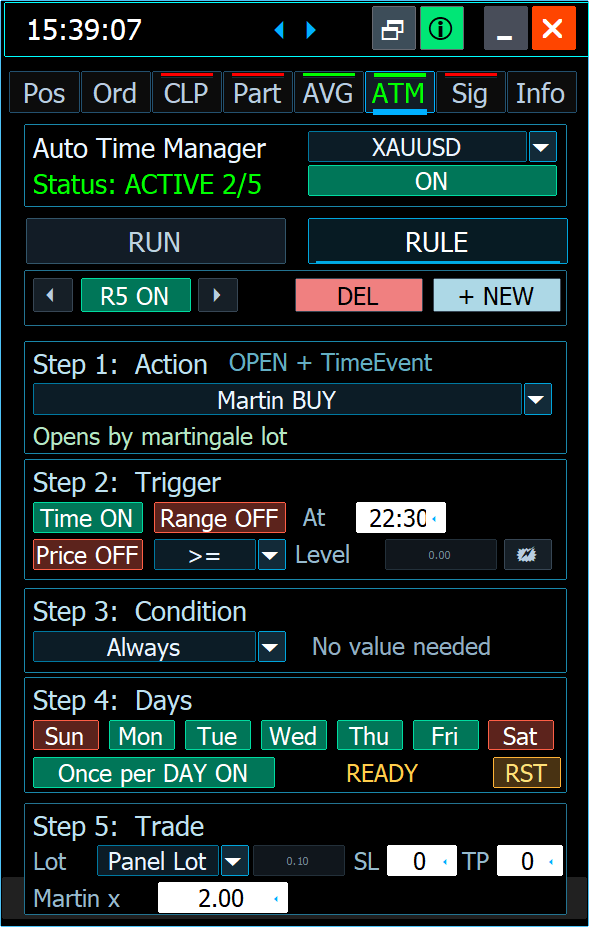
POS、ORD、CLP、PART、AVG、ATM、SIG 和 INFO 不是彼此孤立的界面,而是一个连贯交易管理流程的组成部分。
控制风险与交易结构
以更系统的方式处理分批离场、组合盈亏控制、信号、实时信息、策略测试器检查以及面向 VPS 的配置。




目标很简单: 减少分散操作,提升控制力,让决策更清晰。
从市场环境到交易控制 — 全部直接在图表上完成。
VirtualTradePad PRO SE 围绕 MetaTrader 交易者的真实流程设计:分析图表、执行交易、准备订单、保护仓位、管理离场、构建结构化层级,并测试完整过程。
分析图表
在采取操作前,先使用图表功能、实时信息和市场环境。让点差、关键层级和控制数据始终靠近交易决策。

一个面板,适应不同环境。 保持同样专业的控制体验。
VirtualTradePad PRO SE 旨在多语言工作流程、策略测试器场景、面向 MQL5 VPS 的使用以及不同屏幕尺寸下保持实用。

多语言工作区
使用面向国际交易者设计的多语言界面结构,让日常交易流程更清晰、更舒适。
重要提示: 策略测试器和 VPS 的行为取决于终端环境、经纪商条件以及所选设置。真实交易前请务必测试你的配置。
作为高级 MetaTrader 工作区打造 — 而不是又一个普通面板。
PRO SE 专注于日常工作的质量:更清晰的控制、更快的交互、更安全的配置处理、优化的绘图逻辑、更舒适的视觉体验以及长期产品演进。
即时状态恢复
面板设置、所选模式和图表工作流状态被设计为更可靠地保存和恢复,使工作区在重新加载或迁移流程后能够回到已配置状态。
准备从预览进入实际操作了吗? 选择你的路径。
你可以先测试工具、阅读完整文档,或直接前往适用于你 MetaTrader 终端的官方 MQL5 Market 版本。
先测试
下载软件包,在你的终端中检查面板,然后再选择 Market 版本。
下载 02阅读指南
打开包含设置、模块、FAQ、更新日志和实际使用说明的完整文档。
完整文档 03MetaTrader 5
如果你使用现代 MetaTrader 5 交易环境,请选择 MT5 版本。
购买 / 租用 MT5 04MetaTrader 4
如果你的主要交易流程仍基于 MetaTrader 4,请选择 MT4 版本。
购买 / 租用 MT4深受 MetaTrader 交易者信赖 覆盖全球。
来自 MQL5 用户的真实反馈,他们使用 Expforex 工具进行交易、测试、自动化以及基于图表的 MetaTrader 工作流程。

I've been using the MT4/MT5 versions for years now. I could not trade without this tool, its amazing. Otherwise it is a perfect app. Ok it also has a few formatting issues with previews and numbers on the chart, but cmon its an amazing EA and worth your money! One problem I'm having right now though is as follows: If I have my Stop loss set at 100, and my Take profit at 200, when I go to click the "Buy" button, and I show on the chart where my Take profit and Stop loss would be, they are reversed. So for a buy in this case, my Stop loss would show 200, and my Take profit 100, even though that is the opposit for what I have them set at. This goes for clicking the "Sell" button. Basically, the Take profit and Stop loss previews are backwards, which is very frustrating. -Edit: The issue is being worked on, and I'm sure will be fixed soon. Perfect product and great support from the developer :)

wilsonvivas32
I have been tradings since 2019 manually! and was looking for a tool to help me with my manual trades and must said , I am so greatful for this awesome tool! Is not for a beginner but if you have some experience you will greatly appreciate all the posibilities and freedom to place orders fast that left me speechless!-
P_Morgan
It's a very good tool. The seller answers questions and solves problems clearly. -
Mohamedshah
I have just purchased VirtualTradePad. I can see that the developer has put a huge effort and commitment to make the Virtual Tradepad perfect in all its parameters and functions available. I have checked many similar EA's in MQL5 and this the only EA I can recommend. Thank You! Vladislav Andruschenko for providing this robust EA at an affordable price. -
aph.andy
Very good! Have been using it for 3 days, it increases my profits! Thank you very much -
aph.andy
Very good! Have been using it for 3 days, it increases my profits! Thank you very much -
kpt247
Hi, It's really good EA for manual trading. It's very helpful. Can you add the following functions: 1- Non-stop Auto trading: Buy / Sell / Buy and Sell (also has option to turn ON/OFF filters of some most popular indicators) 2- Auto averaging with: Distance Addition / Distance Martin / Lot Addition / Lot Martin / Max Lot / Max Orders Thank you ! -
klaus_bond
excellent tool. Nearly perfect. What I'm missing is the candle size, the candle body size display on the chart directly near the candle -
marlowyip
This is really awesome. The stop loss control was effected by the magic number. Very frustrating to figure that out. -
kumarmohit111
your work is really great, I salute you 1000 time for your great job, I am using VTP since long. I need your urgent help on below points, I have tried you to contact you many ways, I request everyone to use VTP if you want to be expert enough and very professional, dear vladislav, please look on below request urgent please, now i am requesting you to modify VTP for placing auto pending order once already placed CLP completed. i want four option to be added in CLP setting for placing auto pending order just after auto delete facility given there. the option should be there auto pending order for sell stop, buy stop, sell limit and buy limit separately, so that i can active one or more option simultaneously. note : Activation of auto pending order must start just after running CLP completed and existing pending order deleted, hoping for very positive reply, this is already set CLP for 10 usd profit and 10 % account loss, if this completed successfully there is good setting already given that all pending and active orders deleted self. i want to active pending in auto just after above statement completed, suppose below setting of pending orders i want to active in auto after CLP setting completed, i want to active sell stop and sell limit in auto after already running CLP finished. please do the setting below in CLP options to active pending orders after CLP cycle completed, you can mention four option below the red arrow indicated like 1. active sell stop after CLP 2. active buy stop after CLP 3. active sell limit after CLP 4. active buy limit after CLP i need this all, thanks, -
Alexander Men
Very useful too for manual scalping. Thank you -
ANARCHITECTS
Excellent trading pad for trading with a lot of features. . . .with really quick and good customer help from the developer himself. -
Atila R Akdeniz
Excellent Tool, definitely the best on the market. All of Vladislav's products are of excellent quality, and he provides very good support. With the current prices it's a good time to buy all his products. -
Dave W
This is the best trading pad on the market. So many features, the value is ridiculously good. If you're a manual trader you need this tool. -
Jo nathan
A must have tool. Works great.









交易者在使用前应了解的一切 VirtualTradePad PRO SE。
按主题整理的实用回答:产品概念、安装、交易流程、自动化、测试、VPS、风险、购买和支持。
产品概念与界面
了解 PRO SE 是什么、不是什么,以及如何正确理解该产品。
VirtualTradePad PRO SE 是一个专业 MetaTrader 工作区,以 Expert Advisor 面板形式构建,用于手动交易、订单准备、仓位管理、图表控制和高级工作流模块。
不是。买入/卖出流程只是产品的一部分。PRO SE 还包括挂单、组合控制、分批离场、均价层级、基于规则的管理、信号和实时信息等模块。
不会。它是一个控制和管理工作区。交易思路、风险模型、市场分析和最终决策仍由交易者负责。
是的。界面注重清晰的视觉状态、紧凑的信息块、基于图表的控制以及适合在 MetaTrader 中频繁使用的高级布局。
新手可以使用基础交易功能,但高级模块需要仔细阅读文档,并在模拟账户或策略测试器中进行测试。
目标是将多种交易管理流程整合到一个专业工作区中:执行、订单规划、分批离场、均价处理、规则检查、信号和市场信息。
是的。MetaTrader 4 和 MetaTrader 5 分别提供独立版本。请选择与你的交易终端匹配的版本。
交易流程与模块
交易者如何在真实的图表工作中使用面板。
可以。产品围绕图表交互设计,因此许多交易管理操作、层级和控制项都靠近市场视图。
POS 是主要的手动交易工作区,用于快速执行、手数控制、仓位操作、止损、止盈以及基于图表的交易管理。
ORD 专注于从面板和图表进行结构化订单准备,包括挂单流程、距离逻辑以及 Magic Target 等额外订单规划工具。
当交易者需要对选定交易组进行组合级盈亏控制、按条件平仓或追踪利润逻辑时,CLP 非常有用。
PART 用于结构化分批离场。它帮助处理多个分批平仓层级、可视化区域和受控离场逻辑,而不是一次性关闭整个仓位。
AVG 提供可配置的均价和顺势加仓层级逻辑。由于均价可能快速增加风险敞口,因此只能配合经过测试的策略和风险模型使用。
INFO 提供重要图表和账户环境的实时概览,例如市场参数、风险敞口、盈亏信息以及用于决策的额外控制数据。
测试、自动化与环境
如何处理策略测试器、VPS、自动化以及风险敏感模块。
它在设计时考虑了可视化策略测试器流程。不过测试器行为仍可能取决于终端版本、测试器模式、经纪商品种设置和所选产品配置。
许多可视化操作已针对测试器式交互进行准备。但每个流程都应仔细检查,因为策略测试器的行为并不总是与实时图表完全相同。
它为面向 VPS 的工作流程做好了准备。你应先配置图表、测试行为、正确迁移,并确认所选设置按预期恢复。
产品设计包含配置持久化和状态恢复逻辑。这对于重新加载、图表流程连续性以及面向 VPS 的使用非常重要。
ATM 是基于规则的管理模块。如果已配置并启用,它可以根据所选规则执行操作,因此真实交易前必须仔细测试。
与信号相关的流程可用于监控,并根据设置用于自动化场景。启用自动行为前,交易者必须清楚理解每个设置。
请测试手数大小、订单行为、分批离场、CLP 规则、AVG 层级、ATM 场景、信号设置、交易品种条件、经纪商限制以及 VPS 迁移流程。
购买、文档与支持
如何购买、在哪里阅读说明,以及如何正确请求支持。
官方购买和租用仅通过 MQL5 Market 处理。MetaTrader 4 请使用 MT4 页面,MetaTrader 5 请使用 MT5 页面。
请选择与你的终端匹配的版本。MT4 和 MT5 是不同平台,因此产品版本也是独立的。
完整文档位于产品文档页面,其中包含安装说明、模块描述、设置、FAQ、更新日志和实际使用说明。
请发送截图、Experts 和 Journal 标签中的日志、必要时的设置文件、终端版本、品种名称、经纪商条件,以及清晰的分步问题描述。
技术问题请使用 Comments 或直接支持沟通。Reviews 用于产品评分,不适合详细排查问题。
会。最小手数、手数步进、止损距离、冻结级别、执行模式、点差、佣金、市场时间和品种设置都会影响下单和管理行为。
下载,阅读文档,在模拟账户或策略测试器中测试,确认你需要的具体设置,然后在 MQL5 Market 上选择官方 MT4 或 MT5 版本。
使用以下工具构建你的专业 MetaTrader 工作区 VirtualTradePad PRO SE。
从文档开始,测试工作流程,然后选择适用于 MetaTrader 4 或 MetaTrader 5 的官方 Market 版本。PRO SE 面向希望获得更强控制力、更清晰结构和高级图表工作流的交易者打造。
这篇文章还有以下语言版本: